SERP Research Tool
Find great links in the SERP
Find the best ranking websites for your country, language and niche keywords and build links there.
Features
-
Find strong link sources in your niche
-
Link Prospecting for dozens of keywords at once
-
Combine dozens of Google searches into one

Benefits
-
The strongest link opportunities at your fingertips
-
Automatically filter results by all LRT metrics
-
Aggregate, Deduplicate, Filter, Rank results
-
Ignore domains that are already linking to you
A quick primer on using SERP Research Tool
The best link for “Blue Widgets” is the #1 ranking website for “Blue Widgets”. Then #2, #3, #4 etc. Screen the organic search results for top ranking link prospects, websites, discussion boards, forums that rank well and are relevant in your niche.
-
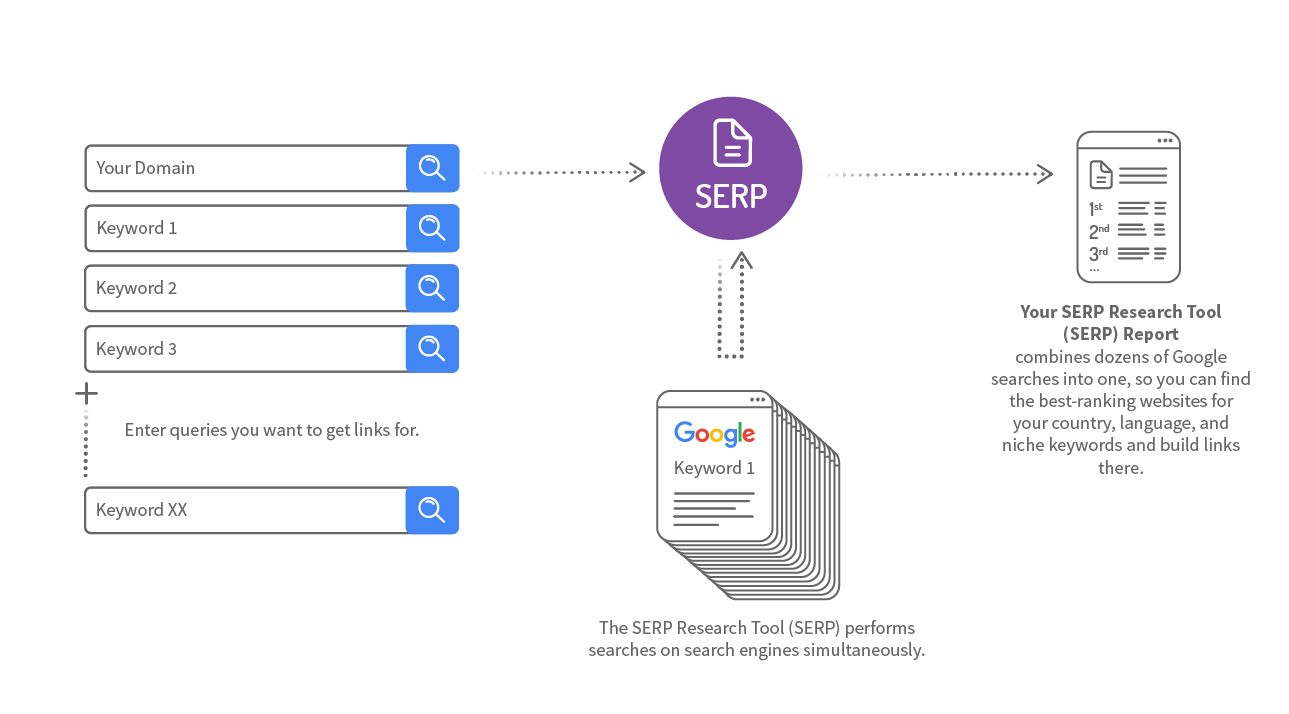
The SERP Research Tool (SERP) performs multiple searches on search engines simultaneously for you.
-
It gets the first 200 results, removes the duplicates.
-
Then you can filter the results by 150+ different metrics.
Example uses are:
- Find Follow links on a blog or a forum that is talking about your niche.
- Complex searches using SEO footprints to find specific website types.
- Find all permutations of a specific keyword you need links for, without hte hassle of the duplicates of course.
The SERP Tool will show you if you already have a link there.
You can export the results and use them in any outreach solution.

SERP Research Tool Features
Advanced filter for finding your existing links
The results table has a column where you can see if you have a link already. It would make sense to try and get a link in as many places as possible, but not to duplicate links and look spammy.
Advanced filter for selecting the site type
From the results table, you can select the type of sites where you can engage with your audience. Forums and blogs are obvious choices. You can sort these by Power*Trust to find the places that are most worthwhile. This is how to find prospects for link building and direct traffic by getting involved with existing discussions.
Power use with complex Google searches
The SERP Tool can be used to input up to 20 keywords. These keywords can also be complex Google search queries.
Once you have the results table, you can now choose to show only the pages with, for example, external links on the page (ExtL) less than < 10 links and then select some places with decent Power*Trust.
Now you export a list of excellent places to start building your links.
Features
25+ Link Data Sources
Link Data from 25+ Data Sources combined.
Full and Rich Exports
You get full XLS exports and rich PDF exports, while competitors cripple their data exports at sometimes 10k rows already.
Link Brain
We can assist you with decades of experience in SEO and links. This is not a matter of course with every SEO software provider.
No Trash Data
The links that we DO NOT deliver to you matter! We take pride in filtering out as much nonsense data from other sources as possible.
How the SERP Research Tool works
Learn more about SERP Research Tool
The SERP tool is used in this case study showing how to use link building footprints.
The SERP tool is used in this case study to find link opportunities in the hairstyling niche. Wojtek Mazur then shows how to sort the results and pick out the best ones.
The SERP tool is used in this case study to find mentions of a brand using footprints. You can then change these mentions to links.