Competitive Landscape Analyzer (CLA)
Use the strongest source pages in your link building.
Compare Link Profiles by dozens of SEO metrics to understand and outperform your competition.
Features
-
Compare your backlink profile
-
Understand how to outperform your competitors
-
Find the ratios for country, language and keywords
-
Learn what ‘natural’ means in you industry
Benefits
-
Compare your site with 10 competitors
-
Understand Follow vs NoFollow links
-
Understand the brand vs. commercial anchor text ratios
-
Understand the link growth patterns of your competitors
A bit lengthy primer on using the really fancy Competitive Landscape Analyzer
- Compare your backlink profile to your competitors
- Understand how to outrank them.
- Find the “magic link ratios” for your niche, language, keywords and your country.
Use LRT to match up with your SEO competitors, then do a little better and outperform them.
The Competitive Landscape Analyzer is part of the comprehensive LinkResearchTools® SEO Toolkit, designed to help you understand your competitors and rank better in search engines.
What You Can Achieve with Competitive Landscape Analyzer (CLA)?
The Competitive Landscape Analyzer (CLA) helps you compare Link Profiles against the link profiles of your competitors.
Your competitors are all sites ranking above you, not just the companies you know.
By understanding the strengths and weaknesses of your website vs. your competition’s website, you can identify SEO opportunities that others don’t see.
By comparing your domain to the domains of your competitors, you get an edge for your SEO!
The Competitive Landscape Analyzer (CLA) takes the guesswork and SEO myths out of your daily work as a digital marketer.
For example, there’s not a “standard” 20:80 ratio for No Follow Links vs. Follow Links. Every industry, topic, keyword, language and country has different rules. And YOU are the one to know those rules, understand them instead of blindly following major SEO blogs like sheep.
By making a comparison of the results on the first page of Google, you get an excellent understanding of what goals you should target. The best approach is to blend in and then do a little better.
Competitive Landscape Analyzer Benefits & Features
Focus on Pages, Categories of the full Domain
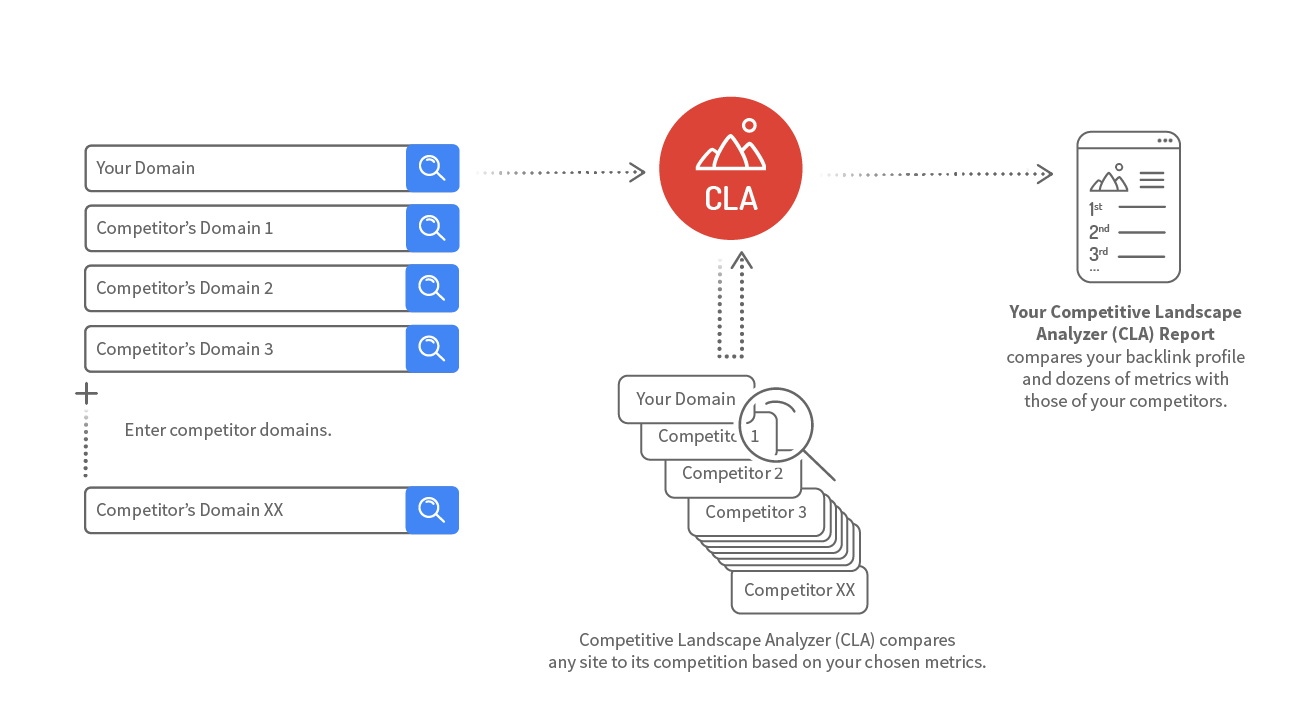
The Competitive Landscape Analyzer (CLA) compares your backlink profile and dozens of other metrics with those of your competitors.
Usually, you compare the backlink profile of the whole domain, but you can also drill-down to compare only subfolders or even individual pages.
Why compare only a page or a subfolder to your competitors?
- Analyze a particular product sold on a page in e-commerce stores
- Analyze a particular product category of e-commerce stores
- Compare only the homepages or the contact page of your domain vs. those of your competitors
- Understand why a competitor’s product page is outperforming your own product page
- The options are limitless.
So you can focus on only those subfolders or pages of your specific SEO analysis, save time and stay focused.
Compare Google Indexation of Your Referring Domains
The Competitive Landscape Analyzer (CLA) helps you understand how well the referring domains of your links are indexed in Google or not. We do this by looking at the number of indexed pages per domain and using our unique TitleRank™ metric.
This helps you spot abnormalities that your site might have and plan a strategy to blend in. For example you might find that:
- You have a large amount of backlinks which are not indexed by Google
- You don’t have many links from large well-indexed sites like your competitors’ do
Analyzing Google Indexed Pages ratios in your niche gives you the insight to help you rank on page one of Google.
You might spot from penalized link networks and other shady places using this method.
Compare Link Type ratios
You can have many different types of links, and so do your competitors.
Different link types are for example text links, image links, rel-canonicals, frames, redirects, mentions and many more.
Competitive Landscape Analyzer (CLA) helps you understand how your backlink profile differs to your competition.
Why do you need to know about Link Type ratios?
The domains that Google ranks on the first page usually have similar link type ratios. If your domain does not have a similar ratio, it could look unnatural to Google and be devalued because of this. You should aim to have similar Link Type ratios to your competitors that rank for similar keywords, in your language and in your country.
You should always aim to have similar Link Type ratios backlink ratios to your competitors. LinkResearchTools helps you do that in a quick and easy way.
Compare Link Velocity Trends
Link velocity describes the speed of link growth to a page or domain. Link velocity trends describe the trends of link growth, i.e. how fast or slow the link growth to a page or domain is in a given time span.
The Competitive Landscape Analyzer (CLA) can show you the Link Velocity Trends of your domain compared to your competitors. Google also does look at growth and change of backlink profiles over time to estimate the organic search rankings.
It is imperative that you understand the natural link growth patterns in your niche to be able to compete with other players. Your goal is to understand: what link growth is ‘natural’ in your niche, for your keyword, for your country.
One thing is sure – there is no same results for different industries, there is not one-size-fits-all in SEO.
The Competitive Landscape Analyzer (CLA) helps you understand the link velocity trends of your backlink profile vs. those of your competitors.
Analyzing Link Velocity Trend ratios in your niche gives you the insight to help you rank on page one of Google.
Compare No Follow/Follow Ratios
Most natural websites have a mix of Follow and No Follow backlinks. Using Competitive Landscape Analyzer (CLA) you can analyze your competitors and see the typical ratios of the domains that are ranking on the first page of Google for your industry, country, language and keyword phrases.
You should always aim to have similar No Follow/Follow backlink ratios to your competitors.
There is no “golden rule” like a 20:80 ratio for No Follow Links vs. Follow Links. Every industry, topic, keyword, language and country has different rules.
And YOU can be the one to know and understand those rules for your niche, instead of blindly following major SEO blogs like sheep.
Compare LRT Power*Trust™ Ratios
The LRT Power*Trust metric is the perfect replacement for Google’s outdated PageRank™ and the lead metric of LinkResearchTools (LRT) to measure link strength and trust.
Most successful sites have a wide range of backlinks with varying LRT Power*Trust values.
Using Competitive Landscape Analyzer (CLA) you can analyze the strength and trust in the back profile of the top performers and your competitors in organic search. Learn what makes the difference and take action with LinkResearchTools (LRT).
Compare Ranking Keywords Ratios
LinkResearchTools provides you with the number or ranking keywords for all referring domains using rich data from Semrush. This metric is another strong indicator for the power of a domain in organic search.
Using the Competitive Landscape Analyzer (CLA) you can understand if the links of your competitors are on strong and well ranking domains or not. Using this metric as another filter on the complete backlink profile you can go after the best links they have, ignoring those on poorly ranking websites.
Comparing your backlink profile based on “ranking keywords” in your niche gives you the insight to rank on page one of Google.
Features
Unique SEO Technique
This Link Building Method is not available in any other SEO tool.
25+ Link Data Sources
Link Data from 25+ Data Sources combined.
Full and Rich Exports
You get full XLS exports and rich PDF exports, while competitors cripple their data exports at sometimes 10k rows already.
Link Brain
We can assist you with decades of experience in SEO and links. This is not a matter of course with every SEO software provider.
Dynamic Filters
Filter your results by up to 150+ SEO metrics.
No Trash Data
The links that we DO NOT deliver to you matter! We take pride in filtering out as much nonsense data from other sources as possible.
How the Competitive Landscape Analyzer works
Learn more about Competitive Landscape Analyzer
Competitive Domain Analysis allows you to compare your online competitors and reveal your own strengths and weaknesses. In this articlearticle, Tom Black shows how to use five of the LRT tools for SEO competitive analysis, including CLA.
The CLA tool is very useful tool to understand the SEO landscape your are link building in.
Negative SEO is now a real threat. This article gives seven tips to prevent Negative SEO happening to you. The case study includes how to use CLA to detect dangerous link ratios.