<?xml version="1.0" encoding="UTF-8"?>
<rss version="2.0"
	xmlns:content="http://purl.org/rss/1.0/modules/content/"
	xmlns:wfw="http://wellformedweb.org/CommentAPI/"
	xmlns:dc="http://purl.org/dc/elements/1.1/"
	xmlns:atom="http://www.w3.org/2005/Atom"
	xmlns:sy="http://purl.org/rss/1.0/modules/syndication/"
	xmlns:slash="http://purl.org/rss/1.0/modules/slash/"
	>

<channel>
	<title>Linkresearchtools</title>
	<atom:link href="http://www.linkresearchtools.com/feed/" rel="self" type="application/rss+xml" />
	<link>http://www.linkresearchtools.com</link>
	<description>Link Research Tools - Be Efficient!</description>
	<lastBuildDate>Tue, 24 Aug 2010 15:39:35 +0000</lastBuildDate>
	<language>en</language>
	<sy:updatePeriod>hourly</sy:updatePeriod>
	<sy:updateFrequency>1</sy:updateFrequency>
	<generator>http://wordpress.org/?v=3.0.1</generator>
		<item>
		<title>Best Link Tool Ever</title>
		<link>http://www.linkresearchtools.com/news/best-link-tool/</link>
		<comments>http://www.linkresearchtools.com/news/best-link-tool/#comments</comments>
		<pubDate>Tue, 10 Aug 2010 09:22:14 +0000</pubDate>
		<dc:creator>admin</dc:creator>
				<category><![CDATA[news]]></category>

		<guid isPermaLink="false">http://test.linkresearchtools.com/?p=3984</guid>
		<description><![CDATA[<p><a href="http://www.linkresearchtools.com/news/best-link-tool/">Best Link Tool Ever</a> is a post from the <a href="http://www.linkresearchtools.com">Best Link Building Tools</a></p>
Best Link Tool Ever is a post from the Best Link Building Tools The new release of our Link Research Tools now makes it the best link tool ever! With the new slick design, new features like  Theme and SiteType category per link and the new MLT tool you will love it just like we [...]]]></description>
			<content:encoded><![CDATA[<iframe src="http://www.facebook.com/plugins/like.php?href=http%3A%2F%2Fwww.linkresearchtools.com%2Fnews%2Fbest-link-tool%2F&amp;layout=standard&amp;show_faces=true&amp;width=450&amp;action=like&amp;colorscheme=light" scrolling="no" frameborder="0" allowTransparency="true" style="border:none; overflow:hidden; width:450px;height:75px;margin-top:5px;"></iframe><p><a href="http://www.linkresearchtools.com/news/best-link-tool/">Best Link Tool Ever</a> is a post from the <a href="http://www.linkresearchtools.com">Best Link Building Tools</a></p>
<div class="tweetmeme_button" style="float: left; margin-right: 10px;">
			<a href="http://api.tweetmeme.com/share?url=http%3A%2F%2Fwww.linkresearchtools.com%2Fnews%2Fbest-link-tool%2F"><br />
				<img src="http://api.tweetmeme.com/imagebutton.gif?url=http%3A%2F%2Fwww.linkresearchtools.com%2Fnews%2Fbest-link-tool%2F&amp;source=lnkresearchtool&amp;style=normal&amp;service=bit.ly" height="61" width="50" /><br />
			</a>
		</div>
<p><strong>The new release of our Link Research Tools now makes it the best link tool ever! With the new slick design, new features like  Theme and SiteType category per link and the new MLT tool you will love it just like we do!</strong></p>
<h2>User Friendly Re-Design</h2>
<p><strong>The LRT now comes with a new intuitive yet elegant design</strong></p>
<p>We listened to your feedback, read every e-mail, collected every comment we got on conferences and re-created the Link Research Tools from scratch. We re-engineered our tools, trying to make it a lot easier for you to use. Also we wanted to find out which features you didn&#8217;t know existed &#8211; and there were a lot. The result is a completely new design and a greatly improved user experience. You&#8217;ll see that everything from creating reports to using them is now easier and faster. But still, if you have any difficulties finding your features: please contact us using the feedback form. We will do everything to make your transition as seemless and pleasant as possible!</p>
<p><strong>Why not </strong><a href="/tour"><strong>Take A Tour</strong></a><strong> through our new version to get a first impression? </strong></p>
<h2>Improved reports</h2>
<p><div id="attachment_3471" class="wp-caption alignright" style="width: 310px"><a href="http://www.linkresearchtools.com/wp-content/uploads/2010/08/linkprofile_ditanet.jpg"><img class="size-full wp-image-3471   " title="batt_charts_cropped" src="http://www.linkresearchtools.com/wp-content/uploads/2010/08/linkprofile_ditanet_cropped.jpg" alt="Site Type" width="300" height="261" /></a><p class="wp-caption-text">New Feature: Site Type</p></div></p>
<p>We&#8217;re proud to say that the heart of our LRT – the reports page – has undergone quite impressive changes. We use the available space more efficiently for charts. Filtering the details table has been improved greatly. The report page now consumes much less of your browser&#8217;s resources and loads data much, much quicker because of that. Seriously: The speed of filtering and sorting has improved at least tenfold, especially on smaller machines like notebooks.</p>
<p>We provide you with even more values to analyze and improve the results of your reports. You can learn about the <strong>site type</strong> of each link. See what kind of pages link back to your company&#8217;s web site: wikis, forums, blogs, social media, etc. You can now chart those down in the link profiles and quickly compare how many links from blogs, directories etc you have in comparison to competitors.</p>
<p>Getting topic relevant links is a basic link building rule<br />
and we help you find those even faster now!</p>
<p>Our  tools will check for the <strong>theme of a site</strong> – providing you with information on the content of each analyzed URL that links to you or your competitor. That makes it even easier now to spot those gems in the heap of links!</p>
<h2>New Values: Site Type and Theme</h2>
<p><div id="attachment_4006" class="wp-caption alignleft" style="width: 257px"><a href="http://www.linkresearchtools.com/wp-content/uploads/2010/08/linkprofile_theme.jpg"><img class="size-full wp-image-4006 " title="linkprofile_theme_cropped" src="http://www.linkresearchtools.com/wp-content/uploads/2010/08/linkprofile_theme_cropped.jpg" alt="Site Theme Value" width="247" height="224" /></a><p class="wp-caption-text">Site Theme Value</p></div></p>
<p>So we added two extremely hot new values: SiteType and Theme.</p>
<p><strong>SiteType</strong>, as the name suggests, identifies the type of website (e.g. Wiki, Forum, Blog, Social Network, etc.).</p>
<p><strong>Theme</strong> identifies the topic of a website (Personal/Blogs, Computers/Internet, Newsgroups/Forums). As the screenshots above and to the left show, we of course also added a link profile for both values.</p>
<h2>Missing Links Tool</h2>
<p><strong>Don&#8217;t lag behind!</strong></p>
<p><div id="attachment_3998" class="wp-caption alignleft" style="width: 310px"><a href="http://www.linkresearchtools.com/wp-content/uploads/2010/08/mlt-details_large.jpg"><img class="size-full wp-image-3998 " title="mlt-details_cropped" src="http://www.linkresearchtools.com/wp-content/uploads/2010/08/mlt-details_cropped.jpg" alt="MLT details small" width="300" height="210" /></a><p class="wp-caption-text">MLT details table</p></div></p>
<p>Our new Missing Links Tool helps you with an important issue of SEO: links that your competitors have and you don&#8217;t. We figured the best way to face this problem is a rather straight forward one, namely to compare and analyze! The MLT provides you with all the important information on an URL&#8217;s backlinks and a detailed listing telling you where you&#8217;re missing out! Since those pages already link to others within your field of interest, there&#8217;s a good chance you will get one as well.</p>
<h2>Extended SSPT with Strongest Subfolders</h2>
<p><div id="attachment_3475" class="wp-caption alignright" style="width: 294px"><a href="http://www.linkresearchtools.com/wp-content/uploads/2010/08/subfolders.jpg"><img class="size-full wp-image-3475 " title="sspt-subfolders_small" src="http://www.linkresearchtools.com/wp-content/uploads/2010/08/sspt-subfolders_small.jpg" alt="SSPT subfolder" width="284" height="195" /></a><p class="wp-caption-text">Strongest Subfolders</p></div></p>
<p>The <strong>SSPT</strong> now features a &#8220;Strongest Subfolders&#8221; feature that groups the pages by subfolder, adds their respective strength and sorts those subfolders &#8211; like the normal URLs table you know already.</p>
<p>So it will tell you even more about where you should try to get links – and where you shouldn&#8217;t. This feature is especially helpful if you are trying to decide which section of a larger site will be your target and you cannot define the exact page where you&#8217;ll get that link.</p>
<h2>Fancy Domains in CBLT and COLT</h2>
<p>In <strong>CBLT</strong> and <strong>COLT</strong> reports we now include &#8220;fancy domains&#8221;. This means that for a few domains like WordPress, Blogspot, etc. we won&#8217;t calculate the number of common links based on the topdomain (&#8220;wordpress.com&#8221;) but the respective subdomains (e.g. &#8220;bob.subdomain.com&#8221;). This makes a lot of sense, as every subdomain on these domains represents a separate website, even though it has the same top domain.</p>
<p>Please note that we are currently converting your old reports to the new LRT. It might take a few hours until everything has been converted.</p>
<h2>Day Pass now includes ALL tools, 72 hours for EUR 10</h2>
<p>You asked for it and we did it &#8211; the Day Pass now allows you to use all the tools, for 72 hours.</p>
<p>In addition to that we lowered the price for the Day Pass to EUR 10 until further notice.</p>
<p><strong>Want more? Checkout our new </strong><a href="/tour"><strong>Product Tour</strong></a><strong> to get a even more comprehensive overview!</strong></p>
<p><strong>You can <a title="Sign Up" href="/members/signup.php">sign up here</a> today to utilize the best link tools ever for yourself!</strong></p>
<p><strong>The first 40 new users get a <span style="color: #ff0000;">40% discount </span>for Superhero and Expert plans for the first month<br />
with coupon code 989705AFB2</strong></p>
<p><strong><br />
</strong></p>
]]></content:encoded>
			<wfw:commentRss>http://www.linkresearchtools.com/news/best-link-tool/feed/</wfw:commentRss>
		<slash:comments>0</slash:comments>
		</item>
		<item>
		<title>Recover Link Juice and Trust from Your Links</title>
		<link>http://www.linkresearchtools.com/news/link-juice-recovery/</link>
		<comments>http://www.linkresearchtools.com/news/link-juice-recovery/#comments</comments>
		<pubDate>Thu, 24 Jun 2010 12:57:10 +0000</pubDate>
		<dc:creator>juergenf</dc:creator>
				<category><![CDATA[news]]></category>

		<guid isPermaLink="false">http://www.linkresearchtools.com/?p=3822</guid>
		<description><![CDATA[<p><a href="http://www.linkresearchtools.com/news/link-juice-recovery/">Recover Link Juice and Trust from Your Links</a> is a post from the <a href="http://www.linkresearchtools.com">Best Link Building Tools</a></p>
Recover Link Juice and Trust from Your Links is a post from the Best Link Building Tools Our new release offers a brand-new tool &#8211; the Link Juice Recovery Tool that finds back links to dead pages on your domain and let&#8217;s you fix them in minutes. In addition to that we have an improved [...]]]></description>
			<content:encoded><![CDATA[<iframe src="http://www.facebook.com/plugins/like.php?href=http%3A%2F%2Fwww.linkresearchtools.com%2Fnews%2Flink-juice-recovery%2F&amp;layout=standard&amp;show_faces=true&amp;width=450&amp;action=like&amp;colorscheme=light" scrolling="no" frameborder="0" allowTransparency="true" style="border:none; overflow:hidden; width:450px;height:75px;margin-top:5px;"></iframe><p><a href="http://www.linkresearchtools.com/news/link-juice-recovery/">Recover Link Juice and Trust from Your Links</a> is a post from the <a href="http://www.linkresearchtools.com">Best Link Building Tools</a></p>
<div class="tweetmeme_button" style="float: left; margin-right: 10px;">
			<a href="http://api.tweetmeme.com/share?url=http%3A%2F%2Fwww.linkresearchtools.com%2Fnews%2Flink-juice-recovery%2F"><br />
				<img src="http://api.tweetmeme.com/imagebutton.gif?url=http%3A%2F%2Fwww.linkresearchtools.com%2Fnews%2Flink-juice-recovery%2F&amp;source=lnkresearchtool&amp;style=normal&amp;service=bit.ly" height="61" width="50" /><br />
			</a>
		</div>
<p><strong>Our new release offers a brand-new tool &#8211; the Link Juice Recovery Tool that finds back links to dead pages on your domain and let&#8217;s you fix them in minutes. In addition to that we have an improved report preview and some more goodies.<br />
</strong></p>
<h2>Link Juice Recovery Tool</h2>
<p>The Link Juice Recovery Tool (LJR) makes it possible to <strong>detect dead pages with backlinks</strong> on your domain. Just type in your domain and run a report. In the results table you get a list of the error pages and the number of backlinks they have. A link to an error page (e.g. 404 error) is a loss in Link Juice for your website and you can keep that juice if you redirect them to other pages on your domain or create a new page in their place!</p>
<p>In the video below Christoph C. Cemper explains the Link Juice Recovery method for you</p>
<p><object classid="clsid:d27cdb6e-ae6d-11cf-96b8-444553540000" width="640" height="385" codebase="http://download.macromedia.com/pub/shockwave/cabs/flash/swflash.cab#version=6,0,40,0"><param name="allowFullScreen" value="true" /><param name="allowscriptaccess" value="always" /><param name="src" value="http://www.youtube.com/v/cQ5Exh4W4Dw&amp;hl=en_US&amp;fs=1&amp;rel=0" /><param name="allowfullscreen" value="true" /><embed type="application/x-shockwave-flash" width="640" height="385" src="http://www.youtube.com/v/cQ5Exh4W4Dw&amp;hl=en_US&amp;fs=1&amp;rel=0" allowscriptaccess="always" allowfullscreen="true"></embed></object></p>
<p>In the following example you can easily see how <a href="http://www.nike.com">Nike could regain a lot of link juice</a> from links they earned but obviously didn&#8217;t care about in structural site changes (speak &#8220;relaunches&#8221;) in the past. That&#8217;s actually very common for large corporations as they often don&#8217;t care about SEO at all as discussed <a href="http://www.cemper.com/seo-knowhow/seo-importance-large-corporations">in a previous CEMPER SEO Q&amp;A post here</a>.</p>
<p><div id="attachment_3829" class="wp-caption aligncenter" style="width: 596px"><img class="size-full wp-image-3829" title="link-juice-recovery-nike" src="http://www.linkresearchtools.com/wp-content/uploads/2010/06/link-juice-recovery-nike.png" alt="Link Juice Recovery Report for Nike.com" width="586" height="296" /><p class="wp-caption-text">Link Juice Recovery Report for Nike.com - lot</p></div></p>
<p>So with the Link Juice Recovery Tool you can check old domains you haven&#8217;t looked at for a while or an (expired) domain you plan to buy. The results of the LJR reports will help you to refresh the domain by implementing proper redirects and <strong>improve traffic and search engine rankings</strong>.</p>
<p>Just imagine for a second that one of the first pages you built on a domain has earned 100 backlinks long ago and for some reason you took that page down. All the backlinks direct the user and especially the search engines to an error page which means that all those links won&#8217;t count toward better rankings. You will leave potential cheap traffic and links (you already have them!) underutilized.</p>
<p>Implementing those redirects isn&#8217;t rocket science, but some tedious work if done by hand.</p>
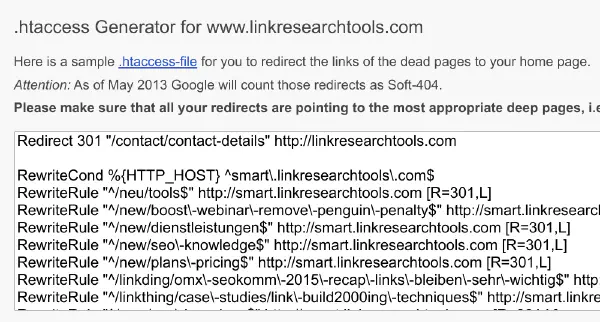
<p>That&#8217;s where our .htaccess Generator comes in to help you redirect all the dead pages to the start page of your website &#8211; in one step! Just copy the code into your <a href="http://www.htaccess-guide.com/?a=2" target="blank">.htaccess file</a> in your Apache web server and you won&#8217;t lose any Link Juice anymore. For other web servers similar methods can be implemented, but everyone uses Apache anyway, right?</p>
<p>In the screenshot below you see that the <a href="http://www.nike.com">Nike SEO would just need a couple minutes of work</a> to capture page rank and trust from links Nike has earned in the past.</p>
<p><div id="attachment_3837" class="wp-caption aligncenter" style="width: 580px"><img class="size-full wp-image-3837" title="link-juice-recovery-htaccess" src="http://www.linkresearchtools.com/wp-content/uploads/2010/06/link-juice-recovery-htaccess.png" alt=".htaccess Generator" width="570" height="260" /><p class="wp-caption-text">How LinkResearchTools LJR could help NIKE earn back link juice with the .htaccess Generator in a couple minutes</p></div></p>
<h2>Better report overview</h2>
<p>The report preview function has been improved to provide the actual data of the report quicker than ever, so you can start with the analysis of your reports a lot earlier. We found in our everyday use that very often already 10-20 % are ready within a couple seconds which are sufficient to keep yourself busy while our crawlers finish their job. Of course if you think you got enough data for a report, you can still terminate it to get your other reports to finish faster.</p>
<h2>Get the Launch Weekend Coupon for 15% off</h2>
<p>To celebrate our new version we&#8217;re offering a special 15% Off coupon for all our products that expires on June 29 at 11:59pm GMT+1.</p>
<p>Simply add the code 8C5687C6BEDA at checkout to get 15% for <a href="http://www.linkresearchtools.com/products-overview/" target="_blank">your product</a> off*!</p>
<h2>&#8230;Or Get the 30% Off Coupon!</h2>
<p>Announce our product launch to your Twitter followers by <a href="http://twitter.com/home?status=Recover%20Page%20Rank%20%26%20Trust%20w%2Fnew%20Link%20Juice%20Recovery%20Tool%20by%20%40lnkresearchtool%20http%3A%2F%2Fbit.ly%2FceReqB%20it's%2030%25%20off%20thru%206%2F29!">clicking here</a> and tweeting our message.</p>
<p>Then follow us on Twitter <a href="http://twitter.com/lnkresearchtool" target="_blank">@lnkresearchtool</a> and we&#8217;ll send you the 30% Off coupon code via DM. This coupon expires on 6/29 11:59pm GMT+1 as well and is valid for all <a href="http://www.linkresearchtools.com/products-overview/" target="_blank">our products</a>*!</p>
<p><b>Here is a <a href="http://twitter.com/home?status=Page%20Rank%20%26%20Trust%20von%20alten%20Links%20retten%20-%20Link%20Juice%20Recovery%20mit%20%40lnkresearchtool%20http%3A%2F%2Fbit.ly%2FcfcU1L%20mit%2030%25%20Rabatt%20bis%2029.6.!">german message</a> to tweet if you prefer that!</b></p>
<p><span style="font-size: medium;"><a href="http://www.linkresearchtools.com/products-overview/" target="_blank">Signup HERE today to recover link juice and trust on your sites!</a></span></p>
<h2>Some recent Testimonials, Reviews and Top Take-Aways</h2>
<ul>
<li><a href="http://www.davidnaylor.co.uk/the-5-best-backlink-analysis-tools.html" target="_blank">Dave Naylor list us in his top 5 Backlink Analysis Tools</a></li>
<li> <a href="http://www.ysmblog.com/blog/2010/03/30/12-stellar-seo-tools/" target="_blank">Yahoo! Search Marketing lists us among their Stellar SEO Tools!</a></li>
<li> <a href="http://www.stateofsearch.com/best-practices-with-link-research-tools/" target="_blank">Evert Veldhuijzen at StateOfSearch on best practices with the LinkResearchTools confesses</a><em><br />
To be honest with you I wasn’t convinced about the toolbox in that period. I was struck by the difficult abbreviations Cemper uses and the amount of data I got. But last month I decided to give the Link Research Tools another try, knowing Christoph made a lot of improvements. And I’ve to admit: now I love it.<br />
</em></li>
<li><a href="http://www.karlkratz.de/onlinemarketing-blog/backlinkanalyse/" target="_blank">Karl Kratz reports:</a><br />
<em><br />
&#8220;&#8230; was so fascinated that I would have stayed up all night with the tools!&#8221;<br />
(german online marketer, translated)<br />
</em></li>
<li> <a href="http://www.felix-kaindl.de/linkbuilding-tools/die-cemper-tools/" target="_blank">Felix Kaindl says: </a><br />
<em><br />
&#8220;&#8230; more link data is not possible anymore!&#8221;<br />
(german online marketer, translated)<br />
</em></li>
<li><a href="http://www.seokratie.de/081146/seo-affiliate-tools-2010/" target="_blank">Julian Dziki confirms that </a><br />
<em><br />
Link Research Tools report the biggest number of links and valuation criteria from any SEO tool!  (german online marketer, translated)<br />
</em></li>
</ul>
<p><strong><br />
We hope that you enjoy this version and wish you a lot<br />
of link juice to recover on your sites!<br />
</strong></p>
<p><em><br />
Best regards<br />
Christoph C. Cemper<br />
and the team of<br />
LinkResearchTools.com<br />
</em></p>
<p>PS: of course all the other great ways to optimize your site like <a href="/tools/sspt">getting links on the strongest pages</a> or<br />
<a href="http://www.linkresearchtools.com/howto/link-profiling-rules/">link profiling your competitors</a> or simply understanding your own <a href="/tools/sspt">backlink and anchor text distribution</a> are things we wish you good luck as well, but those are methods and tools you probably already benefit from!</p>
<p>PPS: If not, give it a try, this is a short term promotion!</p>
<p><span style="font-size: xx-small;">* This promotional discount applies to new clients only and for recurring products only for the first month.</span></p>
]]></content:encoded>
			<wfw:commentRss>http://www.linkresearchtools.com/news/link-juice-recovery/feed/</wfw:commentRss>
		<slash:comments>1</slash:comments>
		</item>
		<item>
		<title>Top 5 Rules for Link Profiling</title>
		<link>http://www.linkresearchtools.com/howto/link-profiling-rules/</link>
		<comments>http://www.linkresearchtools.com/howto/link-profiling-rules/#comments</comments>
		<pubDate>Wed, 12 May 2010 17:17:52 +0000</pubDate>
		<dc:creator>juergenf</dc:creator>
				<category><![CDATA[howto]]></category>

		<guid isPermaLink="false">http://www.linkresearchtools.com/?p=3794</guid>
		<description><![CDATA[<p><a href="http://www.linkresearchtools.com/howto/link-profiling-rules/">Top 5 Rules for Link Profiling</a> is a post from the <a href="http://www.linkresearchtools.com">Best Link Building Tools</a></p>
Top 5 Rules for Link Profiling is a post from the Best Link Building Tools Yesterday we launched our new version that supports Link Profiling automated. Today we are going to dive a bit deeper into the concept of link profiling and sum up with the 5 most important rules to keep in mind when [...]]]></description>
			<content:encoded><![CDATA[<iframe src="http://www.facebook.com/plugins/like.php?href=http%3A%2F%2Fwww.linkresearchtools.com%2Fhowto%2Flink-profiling-rules%2F&amp;layout=standard&amp;show_faces=true&amp;width=450&amp;action=like&amp;colorscheme=light" scrolling="no" frameborder="0" allowTransparency="true" style="border:none; overflow:hidden; width:450px;height:75px;margin-top:5px;"></iframe><p><a href="http://www.linkresearchtools.com/howto/link-profiling-rules/">Top 5 Rules for Link Profiling</a> is a post from the <a href="http://www.linkresearchtools.com">Best Link Building Tools</a></p>
<div class="tweetmeme_button" style="float: left; margin-right: 10px;">
			<a href="http://api.tweetmeme.com/share?url=http%3A%2F%2Fwww.linkresearchtools.com%2Fhowto%2Flink-profiling-rules%2F"><br />
				<img src="http://api.tweetmeme.com/imagebutton.gif?url=http%3A%2F%2Fwww.linkresearchtools.com%2Fhowto%2Flink-profiling-rules%2F&amp;source=lnkresearchtool&amp;style=normal&amp;service=bit.ly" height="61" width="50" /><br />
			</a>
		</div>
<p>
<strong>Yesterday we launched our <a href="http://www.linkresearchtools.com/news/link-profiling-a4uexpo/">new version that supports Link Profiling automated</a>. Today we are going to dive a bit deeper into the concept of link profiling and sum up with the 5 most important rules to keep in mind when doing link profiling.</strong></p>
<h2>What is link profiling?</h2>
<p>Back link profiling is perfect for gaining and understanding in your competitive landscape. When doing competitive research you dig into the backlink profiles of those sites that rank above you, that receive more traffic, that make more money. Simply said, you try to understand why they are ranking better than you.</p>
<h2>Link Profiling is a great way to visualize all that data</h2>
<p>Let&#8217;s take a look at this site. We breakdown their back links by Majestic&#8217;s ACrank, which is similar to MozRank a metric that compares link strength in the original fashion that Google Page Rank was implemented.</p>
<p>This is a reference site for us and we know it has not done any excessive link building, black hat or other artificial stuff in the past (albeit it&#8217;s in a hyper competitive space)</p>
<p><div id="attachment_3795" class="wp-caption aligncenter" style="width: 648px"><img class="size-full wp-image-3795" title="lnkprof1-2010-05-11_1041" src="http://www.linkresearchtools.com/wp-content/uploads/2010/05/lnkprof1-2010-05-11_1041.png" alt="Link Profile by Majestic AC rank" width="638" height="245" /><p class="wp-caption-text">Link Profile by Majestic AC rank</p></div><br />
<br/><br />
Now let&#8217;s look at this site.</p>
<p><div id="attachment_3799" class="wp-caption aligncenter" style="width: 647px"><img class="size-full wp-image-3799" title="lnkprof2-2010-05-11_1055" src="http://www.linkresearchtools.com/wp-content/uploads/2010/05/lnkprof2-2010-05-11_1055.png" alt="High spike for AC Rank 7, 8 and 9" width="637" height="243" /><p class="wp-caption-text">High spike for AC Rank 7, 8 and 9</p></div></p>
<p>We see pretty high, unusual high spike in the backlinks of ACrank 7,8,9 while the &#8220;low ones&#8221; at 4,5,6 are under represented.</p>
<p>This screams &#8220;Link Building High PR/AC Links&#8221;, doesn&#8217;t it?</p>
<p>Digging deeper into the backlinks of the 2nd site we could find all their placements with ACrank 7 and identify some really good possible partners and sponsorships to acquire a link, too. You know why? Because the 2nd site was a highly ranking site that seems to have done it right for _that_ industry.</p>
<p>Of course this example is simplified. You need more sites than two to look at. You need more values than just ACrank to look at. If you look at the other charts for MozRank and the Backlinks counts the picture will change again.</p>
<p>Don&#8217;t believe it?</p>
<p>Here&#8217;s the first site in the MozRank Profile.</p>
<p><div id="attachment_3801" class="wp-caption aligncenter" style="width: 652px"><img class="size-full wp-image-3801" title="lnkprof3-2010-05-11_1055" src="http://www.linkresearchtools.com/wp-content/uploads/2010/05/lnkprof3-2010-05-11_1055.png" alt="MozRank profil for first site" width="642" height="263" /><p class="wp-caption-text">MozRank profil for first site</p></div><br />
<br/><br />
and here&#8217;s the 2nd site again.</p>
<p><div id="attachment_3803" class="wp-caption aligncenter" style="width: 657px"><img class="size-full wp-image-3803" title="lnkprof4-2010-05-11_1056" src="http://www.linkresearchtools.com/wp-content/uploads/2010/05/lnkprof4-2010-05-11_1056.png" alt="MozRank profile for second site" width="647" height="254" /><p class="wp-caption-text">MozRank profile for second site</p></div><br />
<br/><br />
<strong>Top 5 Rules when doing competitive research in your space</strong></p>
<ul>
<li>ALWAYS compare sites within      your industry, and NEVER EVER think that a link profile one industry (say      Finance) follows the same rules as in another industry (say Dating)</li>
<li>ALWAYS look at least at 3 other      websites in your space &#8211; the more the better. It&#8217;s pointless to do a comparison      with one single site that you believe is representative. This is too      simple and actually dangerous.</li>
<li>Keep in mind that you still      look at ONE data value at a time for the back links in a link profile.      Again the more data values you look at, the better &#8211; after all the link      research tools offer you over 40 different values to analyze.</li>
<li>Take notes, take notes and take      more notes. Excel is your friend. Print the reports with &#8220;View      All&#8221; and look at them side by side again to gain a new angle maybe</li>
<li>ALWAYS pick sites of different      performance. If you look at the back link profiles of small/natural sites      compared to highly optimized sites you will soon gain an understanding of      how the SEO landscape is made up in that space.</li>
</ul>
<p><strong>Your advantages for using Link Research Tools for link profiling</strong></p>
<ul>
<li>Combine link data from Google,      Yahoo, Bing, SEOmoz Linkscape, Sistrix, Majestic, Google Webmaster console      and custom link lists</li>
<li>Enrich link data with over 40      different parameters like Page Rank, MozRank, ACrank, Page Authority,      Domain Authority, CEMPER.COM Juice and many more</li>
<li>Chart the back link profiles      automatically with every report</li>
<li><strong>Be efficient &#8211; save time for interpreting results and implementing      actions!</strong></li>
</ul>
]]></content:encoded>
			<wfw:commentRss>http://www.linkresearchtools.com/howto/link-profiling-rules/feed/</wfw:commentRss>
		<slash:comments>0</slash:comments>
		</item>
		<item>
		<title>Link Profiling with Link Research Tools for a4uexpo</title>
		<link>http://www.linkresearchtools.com/news/link-profiling-a4uexpo/</link>
		<comments>http://www.linkresearchtools.com/news/link-profiling-a4uexpo/#comments</comments>
		<pubDate>Tue, 11 May 2010 10:48:58 +0000</pubDate>
		<dc:creator>juergenf</dc:creator>
				<category><![CDATA[news]]></category>

		<guid isPermaLink="false">http://www.linkresearchtools.com/?p=3677</guid>
		<description><![CDATA[<p><a href="http://www.linkresearchtools.com/news/link-profiling-a4uexpo/">Link Profiling with Link Research Tools for a4uexpo</a> is a post from the <a href="http://www.linkresearchtools.com">Best Link Building Tools</a></p>
Link Profiling with Link Research Tools for a4uexpo is a post from the Best Link Building Tools The new &#8220;a4uexpo Version&#8221; of the Link Research Tools offers fully automated support for graphical link profiling, new parameters for Domain and Page authority, even faster load speed and improved search and filter functions for the results. The [...]]]></description>
			<content:encoded><![CDATA[<iframe src="http://www.facebook.com/plugins/like.php?href=http%3A%2F%2Fwww.linkresearchtools.com%2Fnews%2Flink-profiling-a4uexpo%2F&amp;layout=standard&amp;show_faces=true&amp;width=450&amp;action=like&amp;colorscheme=light" scrolling="no" frameborder="0" allowTransparency="true" style="border:none; overflow:hidden; width:450px;height:75px;margin-top:5px;"></iframe><p><a href="http://www.linkresearchtools.com/news/link-profiling-a4uexpo/">Link Profiling with Link Research Tools for a4uexpo</a> is a post from the <a href="http://www.linkresearchtools.com">Best Link Building Tools</a></p>
<div class="tweetmeme_button" style="float: left; margin-right: 10px;">
			<a href="http://api.tweetmeme.com/share?url=http%3A%2F%2Fwww.linkresearchtools.com%2Fnews%2Flink-profiling-a4uexpo%2F"><br />
				<img src="http://api.tweetmeme.com/imagebutton.gif?url=http%3A%2F%2Fwww.linkresearchtools.com%2Fnews%2Flink-profiling-a4uexpo%2F&amp;source=lnkresearchtool&amp;style=normal&amp;service=bit.ly" height="61" width="50" /><br />
			</a>
		</div>
<p>
<strong>The new &#8220;a4uexpo Version&#8221; of the Link Research Tools offers fully automated support for graphical link profiling, new parameters for Domain and Page authority, even faster load speed and improved search and filter functions for the results. The usability improvements will make data analysis a lot easier for you and you will save some precious time.</strong></p>
<h2>Link Profiles</h2>
<p><div id="attachment_3750" class="wp-caption aligncenter" style="width: 607px"><img src="http://www.linkresearchtools.com/wp-content/uploads/2010/05/link-profile-acrank.png" alt="Link Profile for AC Rank" title="link-profile-acrank" width="597" height="315" class="size-full wp-image-3750" /><p class="wp-caption-text">Link Profile for AC Rank</p></div></p>
<p>The &#8220;link profiling&#8221; feature does build a profile (a link histogram of the listed links by one value) just as <a href="http://www.seomoz.org/blog/link-profiling-with-open-site-explorer" target="blank">Pete recently wrote on SEOmoz</a> for the single authority value. The benefit here is that our tool it&#8217;s <strong>many analysis values built in</strong> and fully <strong>automated</strong>. So it&#8217;s not just one backlink profile, it works for many different types of SEO values to look at. For example you can get the profiles by Yahoo Backlinks, Majestic ACrank, Google Page Rank, Page or Domain Authority or the SEOmoz Mozrank.</p>
<p>A link profile shows how many of the backlinks have a certain value, e.g. how many links have an AC Rank of 1 or 2. As you can see in the example picture above, the majority of backlinks (940) have an AC Rank of 3.</p>
<p><div id="attachment_3773" class="wp-caption aligncenter" style="width: 653px"><img src="http://www.linkresearchtools.com/wp-content/uploads/2010/05/link-profile-page-authority1.png" alt="Link Profile by SEOmoz Page Authority" title="link-profile-page-authority" width="643" height="319" class="size-full wp-image-3773" /><p class="wp-caption-text">Link Profile by SEOmoz Page Authority</p></div></p>
<p>The above screenshot shows the link profile by Page Authority (MozAuthPage). You can see that most of the analyzed backlinks have a Page Authority between 0 and 10. Only a few have a MozAuthPage that is above 40.<br />
<br/><br />
<div id="attachment_3775" class="wp-caption aligncenter" style="width: 664px"><img src="http://www.linkresearchtools.com/wp-content/uploads/2010/05/link-profile-domain-authority-new.png" alt="Link Profile by SEOmoz Domain Authority" title="link-profile-domain-authority-new" width="654" height="262" class="size-full wp-image-3775" /><p class="wp-caption-text">Link Profile by SEOmoz Domain Authority</p></div></p>
<p>In the screenshot for the MozAuthDom link profile the majority of backlinks have a Domain Authority of about 50. 322 backlinks come from domains with an authority value of about 90 so the input URLs gets a good amount of links from trusted domains.</p>
<p>Until now you had to export all the data as .csv file and analyze it in an excel sheet. Now you can see the link profiles right in the report results and you <strong>save a lot of time</strong>.</p>
<p>No need for tedious excel copy/paste work anymore! <img src='http://www.linkresearchtools.com/wp-includes/images/smilies/icon_smile.gif' alt=':-)' class='wp-smiley' /> </p>
<p>Stay tuned, we will post more examples and tips how to use link profiles tomorrow.</p>
<h2>Search Functions</h2>
<p><div id="attachment_3756" class="wp-caption aligncenter" style="width: 556px"><img src="http://www.linkresearchtools.com/wp-content/uploads/2010/05/url-search-function1.png" alt="URL and Anchortext search function" title="url-search-function" width="546" height="107" class="size-full wp-image-3756" /><p class="wp-caption-text">URL and Anchortext search function</p></div><br />
A search function was added to the report details table. Now you can search for phrases in URLs. In BATT reports you can also search the anchor texts. Just type in a phrase in the URLs line above the details table and the URLs containing the phrase will be <strong>automatically searched and shown</strong>. If you want to go back to the initial settings, just click the &#8220;clear&#8221; button.<br />
<br/></p>
<h2>Click-On-a-Link Search with linked tables</h2>
<p><div id="attachment_3727" class="wp-caption alignleft" style="width: 360px"><img src="http://www.linkresearchtools.com/wp-content/uploads/2010/05/Anchortext_News.png" alt="New Anchor Text Search/Filter Function" title="Anchortext_News" width="350" height="410" class="size-full wp-image-3727" /><p class="wp-caption-text">New Anchor Text Search/Filter Function</p></div></p>
<p>A search function can also be found in other report tables, e.g. the Anchor Text Breakdown or the Follow/Nofollow tables. Just <strong>click on a line</strong> in a table, e.g. the &#8220;News &#038; Aktuelles&#8221; line in the Anchor Text table in a BATT report (see example at the left).</p>
<p>Then the report details table will only show all anchor texts that include &#8220;News &#038; Aktuelles&#8221;. This new feature will help to save time and enhance the analysis of the provided data.<br />
<br/></p>
<h2>SEOmoz Parameter Package</h2>
<p><div id="attachment_3741" class="wp-caption alignright" style="width: 210px"><a href="http://www.linkresearchtools.com/wp-content/uploads/2010/05/seomoz-parameter-pack.png"><img src="http://www.linkresearchtools.com/wp-content/uploads/2010/05/seomoz-parameter-pack_crop.png" alt="SEOmoz Parameter Package" title="seomoz-parameter-package" width="200" height="150" class="size-full wp-image-3741" /></a><p class="wp-caption-text">SEOmoz Parameter Package</p></div></p>
<p>The new SEOmoz parameter package includes MozRank for domains (MozRankDom) and the SEOmoz Backlinks (Moz!BL). Additionally, the package includes the SEOmoz Page Authority and SEOmoz Domain Authority. The MozRankDom is a metric comparable with the Google PR and it is a <strong>useful source for comparison</strong> with the manipulated Google PR (TBPR). The SEOMoz Page and Domain Authority are measures for the &#8220;authority&#8221; of a page and show you if a site is trusted.<br />
<br/></p>
<h2>Link Status &#8220;Mention&#8221;</h2>
<p><div id="attachment_3717" class="wp-caption alignleft" style="width: 210px"><a href="http://www.linkresearchtools.com/wp-content/uploads/2010/05/link-status-mention.png"><img src="http://www.linkresearchtools.com/wp-content/uploads/2010/05/link-status-mention_crop.png" alt="Link Status &quot;Mention&quot;" title="link-status-mention_crop" width="200" height="150" class="size-full wp-image-3717" /></a><p class="wp-caption-text">Link Status Mention</p></div>In the BATT reports a new Link Status is shown, namely &#8220;Mention&#8221;. So far we only showed if a link is &#8220;Follow&#8221; or &#8220;Nofollow&#8221;. On many websites there are URLs posted that are just plain text (not hyperlinked). Now these URLs are also shown in the Follow/Nofollow pie chart and table as &#8220;Mention&#8221;. This feature is an useful addition to the BATT that adds a new dimension to the backlinks profiles we provide.<br />
<br/></p>
<h2>Improved report load speed</h2>
<p>The graphics used for the illustration of the report results are not flash anymore. This helps to reduce the load time of the report details page and reports can now also be accessed via the iPhone.</p>
<h2>A4Uexpo and discount code</h2>
<p>We dedicate this version to the awesome A4Uexpo conference taking place in Munich next week. Christoph is speaking there on Killer Link Building Strategies with Dave Naylor, Dixon Jones of Majestic, Marcus Tandler and Ralph Tegtmeier. If you haven&#8217;t registered yet, you can use the code SPK10 which gives you a 10% discount.</p>
<p><strong>Also you can use the code 71D7922F2FDAA8CE to signup to our tools and gain 15% discount. This code expires May 31</strong></p>
<p><i>We hope you find the new features and especially the link profiling<br />
just as cool as we do and look forward to your feedback!</i></p>
]]></content:encoded>
			<wfw:commentRss>http://www.linkresearchtools.com/news/link-profiling-a4uexpo/feed/</wfw:commentRss>
		<slash:comments>3</slash:comments>
		</item>
		<item>
		<title>All You Can Eat in a Link Tool</title>
		<link>http://www.linkresearchtools.com/news/all-you-can-eat-link-tool/</link>
		<comments>http://www.linkresearchtools.com/news/all-you-can-eat-link-tool/#comments</comments>
		<pubDate>Wed, 28 Apr 2010 11:27:22 +0000</pubDate>
		<dc:creator>juergenf</dc:creator>
				<category><![CDATA[news]]></category>

		<guid isPermaLink="false">http://www.linkresearchtools.com/?p=3645</guid>
		<description><![CDATA[<p><a href="http://www.linkresearchtools.com/news/all-you-can-eat-link-tool/">All You Can Eat in a Link Tool</a> is a post from the <a href="http://www.linkresearchtools.com">Best Link Building Tools</a></p>
All You Can Eat in a Link Tool is a post from the Best Link Building Tools Our new &#8220;All You Can Eat in a Link Tool&#8221; version now provides more backlinks for analysis than ever. We now provide full integration into seoMoz LinkScape and a cool time saver with the report preview feature. SEOmoz [...]]]></description>
			<content:encoded><![CDATA[<iframe src="http://www.facebook.com/plugins/like.php?href=http%3A%2F%2Fwww.linkresearchtools.com%2Fnews%2Fall-you-can-eat-link-tool%2F&amp;layout=standard&amp;show_faces=true&amp;width=450&amp;action=like&amp;colorscheme=light" scrolling="no" frameborder="0" allowTransparency="true" style="border:none; overflow:hidden; width:450px;height:75px;margin-top:5px;"></iframe><p><a href="http://www.linkresearchtools.com/news/all-you-can-eat-link-tool/">All You Can Eat in a Link Tool</a> is a post from the <a href="http://www.linkresearchtools.com">Best Link Building Tools</a></p>
<div class="tweetmeme_button" style="float: left; margin-right: 10px;">
			<a href="http://api.tweetmeme.com/share?url=http%3A%2F%2Fwww.linkresearchtools.com%2Fnews%2Fall-you-can-eat-link-tool%2F"><br />
				<img src="http://api.tweetmeme.com/imagebutton.gif?url=http%3A%2F%2Fwww.linkresearchtools.com%2Fnews%2Fall-you-can-eat-link-tool%2F&amp;source=lnkresearchtool&amp;style=normal&amp;service=bit.ly" height="61" width="50" /><br />
			</a>
		</div>
<p><strong>Our new &#8220;All You Can Eat in a Link Tool&#8221; version now provides more backlinks for analysis than ever. We now provide full integration into seoMoz LinkScape and a cool time saver with the report preview feature.</strong></p>
<h2>SEOmoz Linkscape data import</h2>
<p><div id="attachment_3648" class="wp-caption alignleft" style="width: 210px"><a href="http://www.linkresearchtools.com/wp-content/uploads/2010/04/seomoz-links.png"><img class="size-full wp-image-3648" title="seomoz-links" src="http://www.linkresearchtools.com/wp-content/uploads/2010/04/seomoz-links_crop.png" alt="New SEOmoz Backlinks import" width="200" height="150" /></a><p class="wp-caption-text">New SEOmoz Backlinks source</p></div></p>
<p>You can now also analyze backlinks imported from SEOmoz Linkscape (which equates the data of the Open Site Explorer) for either single pages or whole domains. This new link backend is supported in the Backlink and Anchortext Tool (BATT) and the hubfinder AKA Common Backlinks Tool (CBLT). Now you can choose any or all of six different links source for backlinks to pages and six different sources for backlinks to domain in the CBLT and BATT. In addition to that you can also upload your custom link data files, e.g. from the Google Webmaster Console. This is unparalleled in the market of link building tools and guarantees you a maximum of backlinks to review. But the <b>best of all is, that we recrawl all those links to make sure you get accurate status and anchortexts</b> &#8211; no more chasing links that were removed months ago!</p>
<h2>Report Preview Feature</h2>
<p><div id="attachment_3654" class="wp-caption alignright" style="width: 210px"><a href="http://www.linkresearchtools.com/wp-content/uploads/2010/04/preview-report-link.png"><img class="size-full wp-image-3654" title="preview-report-link" src="http://www.linkresearchtools.com/wp-content/uploads/2010/04/preview-report-link_crop.png" alt="New Report Preview" width="200" height="149" /></a><p class="wp-caption-text">New Report Preview</p></div></p>
<p>With the report preview feature you can now have a look at the result URLs while a report is still running. This means you can already start to analyze some results before the report is finished. Of course the full result is only shown when the report is finished. This will save you precious time. Handy additional option here is that you can also terminate a report while it&#8217;s running because you either have enough sufficient results or missed some input urls or need changed report settings. This immediately frees up your slot for processing a new report. You find the &#8220;Preview Report&#8221; link in the Actions column of the report overview, next to the &#8220;Re-Run Report&#8221; link.</p>
<h2>Improved Forward and Back Link Processing</h2>
<p><div id="attachment_3660" class="wp-caption alignleft" style="width: 210px"><a href="http://www.linkresearchtools.com/wp-content/uploads/2010/04/extracted-links-2000.png"><img class="size-full wp-image-3660" title="extracted-links-2000" src="http://www.linkresearchtools.com/wp-content/uploads/2010/04/extracted-links-2000_crop.png" alt="Extracted Links increased to 2000" width="200" height="150" /></a><p class="wp-caption-text">Extracted Links increased to 2000</p></div></p>
<p>The way forward and backlinks are saved and processed in our backend has been improved. Now the BATT, CBLT and COLT reports will run faster. This will enhance usability and save time again. You will particularly notice the speed change when you run reports that gather a big amount of data. The number of backlinks we extract per source in BATT and CBLT reports has been increased to a maximum of 2000 &#8211; so you get more backlink information for deep analysis. Expect this limit to be increased even further in upcoming additions.</p>
<p><b>How&#8217;s that for an &#8220;All You Can Eat&#8221; edition?</b></p>
<p>(or as a german review mentioned &#8220;more link data isn&#8217;t possible&#8221; &#8211; &#8220;Mehr Linkdaten gehen nicht&#8221;)</p>
<h2>Free Daypasses</h2>
<p>To encourage you trialing our new version ASAP,<br />
we give away 10 free day passes (good for 72 hours)<br />
that can signup for a new account (or extend their existing one) with one of<br />
the following 10 codes.</p>
<p><b>Looking forward to your feedback.</b></p>
<p>488A1006697AFFCB<br />
0B9AF435DEC383FA<br />
31E3EBAF22423D24<br />
C47C05130CFF79EF<br />
A33712A4DC61432E<br />
A285AB2052010033<br />
AC3C1C9D185AF841<br />
439D199E0580C1F4<br />
EB6D60F0CAF8397F<br />
605B71EDCFC7C29D</p>
]]></content:encoded>
			<wfw:commentRss>http://www.linkresearchtools.com/news/all-you-can-eat-link-tool/feed/</wfw:commentRss>
		<slash:comments>5</slash:comments>
		</item>
		<item>
		<title>Best Backlink Tools at CAC Amsterdam</title>
		<link>http://www.linkresearchtools.com/news/best-backlink-tools/</link>
		<comments>http://www.linkresearchtools.com/news/best-backlink-tools/#comments</comments>
		<pubDate>Mon, 12 Apr 2010 13:51:11 +0000</pubDate>
		<dc:creator>juergenf</dc:creator>
				<category><![CDATA[news]]></category>

		<guid isPermaLink="false">http://www.linkresearchtools.com/?p=3530</guid>
		<description><![CDATA[<p><a href="http://www.linkresearchtools.com/news/best-backlink-tools/">Best Backlink Tools at CAC Amsterdam</a> is a post from the <a href="http://www.linkresearchtools.com">Best Link Building Tools</a></p>
Best Backlink Tools at CAC Amsterdam is a post from the Best Link Building Tools Just as Dave Naylor featured us among the 5 best backlink analysis tools&#8221; in his review today, we are happy to present you a new version of our Link Research Tools. This version is dedcated to the Casino Affililate Convention [...]]]></description>
			<content:encoded><![CDATA[<iframe src="http://www.facebook.com/plugins/like.php?href=http%3A%2F%2Fwww.linkresearchtools.com%2Fnews%2Fbest-backlink-tools%2F&amp;layout=standard&amp;show_faces=true&amp;width=450&amp;action=like&amp;colorscheme=light" scrolling="no" frameborder="0" allowTransparency="true" style="border:none; overflow:hidden; width:450px;height:75px;margin-top:5px;"></iframe><p><a href="http://www.linkresearchtools.com/news/best-backlink-tools/">Best Backlink Tools at CAC Amsterdam</a> is a post from the <a href="http://www.linkresearchtools.com">Best Link Building Tools</a></p>
<div class="tweetmeme_button" style="float: left; margin-right: 10px;">
			<a href="http://api.tweetmeme.com/share?url=http%3A%2F%2Fwww.linkresearchtools.com%2Fnews%2Fbest-backlink-tools%2F"><br />
				<img src="http://api.tweetmeme.com/imagebutton.gif?url=http%3A%2F%2Fwww.linkresearchtools.com%2Fnews%2Fbest-backlink-tools%2F&amp;source=lnkresearchtool&amp;style=normal&amp;service=bit.ly" height="61" width="50" /><br />
			</a>
		</div>
<p><strong>Just as Dave Naylor featured us among the <a href="http://www.davidnaylor.co.uk/the-5-best-backlink-analysis-tools.html">5 best backlink analysis tools&#8221;</a> in his review today, we are happy to present you a new version of our Link Research Tools. This version is dedcated to the Casino Affililate Convention (CAC) in Amsterdam this week where Christoph will present in two slots.</strong></p>
<p>We again added some new features to improve the usability of the tools and managed to increase report speed during peak times.</p>
<h2>Copy/Paste feature in table</h2>
<p><div id="attachment_3540" class="wp-caption alignleft" style="width: 210px"><a href="http://www.linkresearchtools.com/wp-content/uploads/2010/04/copy-paste-feature.png"><img src="http://www.linkresearchtools.com/wp-content/uploads/2010/04/copy-paste-feature_crop.png" alt="Copy/Paste feature for report result lines" title="copy-paste-feature" width="200" height="150" class="size-full wp-image-3540" /></a><p class="wp-caption-text">Copy/Paste feature for report result lines</p></div>If you select one or several lines in the report results, the lines will be marked light blue and then you simply have to copy the lines (press Ctrl+C). Now you can paste the chosen lines into a spreadsheet program like Microsoft Excel. Of course you can still export an entire report into .csv format and open it in Excel.<br />
<br/></p>
<h2>Sistrix Backlinks import for CBLT</h2>
<p><div id="attachment_3542" class="wp-caption alignright" style="width: 210px"><a href="http://www.linkresearchtools.com/wp-content/uploads/2010/04/CBLT-sistrix-backlinks.png"><img src="http://www.linkresearchtools.com/wp-content/uploads/2010/04/CBLT-sistrix-backlinks_crop.png" alt="Sistrix Backlinks for CBLT reports" title="CBLT-sistrix-backlinks" width="200" height="150" class="size-full wp-image-3542" /></a><p class="wp-caption-text">Sistrix Backlinks for CBLT reports</p></div>
<p>We have added a new link source for Common Backlinks Tool reports: <a href="http://bit.ly/sistrix-de" target="blank">Sistrix</a> Backlinks for a given domain can now also be selected to find the common backlinks of your input URL&#8217;s domains. </p>
<p>You can now get Technorati links, Alexa Backlinks, Yahoo domain backlinks (also the ones via SiteExplorer) and Sistrix Backlinks for the input domains you want to analyze. This <strong>variety of link sources</strong> will give you a detailed overview of the common backlinks of the domains and help you find the top websites to get a link on. The Sistrix Backlinks have already been implemented as link source for the BATT reports in the last version.</p>
<h2>Min/Standard/Max view for report columns</h2>
<p><div id="attachment_3567" class="wp-caption alignleft" style="width: 210px"><a href="http://www.linkresearchtools.com/wp-content/uploads/2010/04/Standard_View.png"><img src="http://www.linkresearchtools.com/wp-content/uploads/2010/04/min-max-standard-view_crop.png" alt="New Report Results View Options" title="min-max-standard-view" width="200" height="150" class="size-full wp-image-3567" /></a><p class="wp-caption-text">New Report Results View Options</p></div>Another new feature offers the possibility to quickly view the report results with <strong>varying number of columns</strong>. The minimum view only shows the most important values for an URL like Juice, Yahoo Backlinks, Google Page Rank or the Sistrix Sichtbarkeitsindex. The maximum view shows all the values crawled for the report. The number of parameters shown in a certain view depends on the packages you have chosen for the report.</p>
<h2>Image Link display changed</h2>
<p><div id="attachment_3587" class="wp-caption alignleft" style="width: 210px"><a href="http://www.linkresearchtools.com/wp-content/uploads/2010/04/no-alt-text.png"><img src="http://www.linkresearchtools.com/wp-content/uploads/2010/04/no-alt-text_crop.png" alt="Image with no alt-text" title="no-alt-text" width="200" height="150" class="size-full wp-image-3587" /></a><p class="wp-caption-text">Image with no alt-text</p></div>We now display image links a bit differently. Previously we only differntiated between [IMG] (for images without ALT texts) and images that had ALT texts (but showed only the ALT text in the breakdown). No we show ALT texts of images as [IMG]<alt text of the image> and images without ALT texts as [IMG no alt-text].</p>
<p><div id="attachment_3593" class="wp-caption alignright" style="width: 210px"><a href="http://www.linkresearchtools.com/wp-content/uploads/2010/04/cemper.at-ANCHORS.png"><img src="http://www.linkresearchtools.com/wp-content/uploads/2010/04/cemper.at-ANCHORS_crop1.png" alt="Image without alt-text for cemper.at" title="cemper.at-ANCHORS" width="200" height="150" class="size-full wp-image-3593" /></a><p class="wp-caption-text">Image without alt-text for cemper.at</p></div>
<p>This helps you find <strong>images optimization</strong> possibilities even easier, so if you look at the example on the right of cemper.at we had an image link of a conference without ALT text. Obviously we contacted them to ask if they could add an ALT text to the image to give the image more meaning and the link more anchor text weight. You should do the same with your image links.</p>
<h2>Faster report processing</h2>
<p>We worked on our backend to improve the speed of the reports during the &#8220;rush hours&#8221; of the Link Research Tools. Now <strong>parallel report processing</strong> during peak hours is faster and this will save you time and nerves. So if you start more reports at once, they will be done significantly faster than before.</p>
<h2>New Traffic Indicators</h2>
<p><div id="attachment_3575" class="wp-caption alignleft" style="width: 210px"><a href="http://www.linkresearchtools.com/wp-content/uploads/2010/04/alexa-compete-rank.png"><img src="http://www.linkresearchtools.com/wp-content/uploads/2010/04/alexa-compete-rank_crop.png" alt="Alexa and Compete Rank" title="alexa-compete-rank" width="200" height="150" class="size-full wp-image-3575" /></a><p class="wp-caption-text">Alexa and Compete Rank</p></div>Our new Traffic Indicator parameter package contains the <strong>Alexa Rank</strong> and the <strong>Compete Rank</strong>. Both provide estimations about the traffic that a page receives and are good indicators for the popularity of a website. We offer two traffic indicators since they use different methods to measure and are biased in some way, e.g. the Alexa Rank only counts the visits to a site by users that have the Alexa toolbar installed. So you best take both of them into account to anaylze the traffic.</p>
<h2>New Majestic Metrics</h2>
<p><div id="attachment_3553" class="wp-caption alignleft" style="width: 210px"><a href="http://www.linkresearchtools.com/wp-content/uploads/2010/04/majestic-factors.png"><img src="http://www.linkresearchtools.com/wp-content/uploads/2010/04/majestic-factors_crop.png" alt="New Majestic parameter package" title="majestic-factors" width="200" height="150" class="size-full wp-image-3553" /></a><p class="wp-caption-text">New Majestic parameter package</p></div>The new Majestic parameter package includes two values that help you with the analysis of the backlinks of a website: <strong>MJbl</strong> and <strong>MJbldom</strong>. MJbl show all the backlinks to a page and MJbldom counts the number of backlinks to a domain. These values can be seen as an addition to our many other backlink sources and will complete the backlink profile of the analyzed sites.</p>
<h2>Interface and text cleanup</h2>
<p>As you will realize the content of the toolkit was improved to make the tools more user-friendly. For example, we added text to the navigation buttons on the top right of the toolkit to make it easier to get along on the site and we put the URL box always to the top.</p>
]]></content:encoded>
			<wfw:commentRss>http://www.linkresearchtools.com/news/best-backlink-tools/feed/</wfw:commentRss>
		<slash:comments>1</slash:comments>
		</item>
		<item>
		<title>Analyze back links from SEOMoz, Google Webmaster Tools, Sistrix, Majestic SEO, SEMrush</title>
		<link>http://www.linkresearchtools.com/news/seomoz-sistrix-majestic-gwt-semrush/</link>
		<comments>http://www.linkresearchtools.com/news/seomoz-sistrix-majestic-gwt-semrush/#comments</comments>
		<pubDate>Wed, 10 Mar 2010 18:28:47 +0000</pubDate>
		<dc:creator>juergenf</dc:creator>
				<category><![CDATA[news]]></category>

		<guid isPermaLink="false">http://www.linkresearchtools.com/?p=3313</guid>
		<description><![CDATA[<p><a href="http://www.linkresearchtools.com/news/seomoz-sistrix-majestic-gwt-semrush/">Analyze back links from SEOMoz, Google Webmaster Tools, Sistrix, Majestic SEO, SEMrush</a> is a post from the <a href="http://www.linkresearchtools.com">Best Link Building Tools</a></p>
Analyze back links from SEOMoz, Google Webmaster Tools, Sistrix, Majestic SEO, SEMrush is a post from the Best Link Building Tools The new Link Research Tools version dedicated to the SEO Campixx 2010 in Berlin includes new analysis parameters, new link sources and some brand new features that enhance the usability of our tools. In [...]]]></description>
			<content:encoded><![CDATA[<iframe src="http://www.facebook.com/plugins/like.php?href=http%3A%2F%2Fwww.linkresearchtools.com%2Fnews%2Fseomoz-sistrix-majestic-gwt-semrush%2F&amp;layout=standard&amp;show_faces=true&amp;width=450&amp;action=like&amp;colorscheme=light" scrolling="no" frameborder="0" allowTransparency="true" style="border:none; overflow:hidden; width:450px;height:75px;margin-top:5px;"></iframe><p><a href="http://www.linkresearchtools.com/news/seomoz-sistrix-majestic-gwt-semrush/">Analyze back links from SEOMoz, Google Webmaster Tools, Sistrix, Majestic SEO, SEMrush</a> is a post from the <a href="http://www.linkresearchtools.com">Best Link Building Tools</a></p>
<div class="tweetmeme_button" style="float: left; margin-right: 10px;">
			<a href="http://api.tweetmeme.com/share?url=http%3A%2F%2Fwww.linkresearchtools.com%2Fnews%2Fseomoz-sistrix-majestic-gwt-semrush%2F"><br />
				<img src="http://api.tweetmeme.com/imagebutton.gif?url=http%3A%2F%2Fwww.linkresearchtools.com%2Fnews%2Fseomoz-sistrix-majestic-gwt-semrush%2F&amp;source=lnkresearchtool&amp;style=normal&amp;service=bit.ly" height="61" width="50" /><br />
			</a>
		</div>
<p><strong>The new Link Research Tools version dedicated to the SEO Campixx 2010 in Berlin includes new analysis parameters, new link sources and some brand new features that enhance the usability of our tools. In short &#8211; it means A LOT MORE LINKS and data for our users!</strong></p>
<h2>Analyze Sistrix link data</h2>
<p><strong>Automatically import back links from the <a href="http://bit.ly/sistrix-de" target=blank">Sistrix</a> toolbox</strong></p>
<p><div id="attachment_3468" class="wp-caption alignleft" style="width: 210px"><img src="http://www.linkresearchtools.com/wp-content/uploads/2010/03/sistrix-backlinks-crop.png" alt="Sistrix Backlinks for a given domain" title="sistrix-backlinks" width="200" height="150" class="size-full wp-image-3468" /><p class="wp-caption-text">Sistrix Backlinks for a given domain</p></div><strong>Analyze links based on Sistrix link data</strong></p>
<p>The import of various link sources was requested by many users, the proposals got more than 50 votes on our feedback site. Now you can search for Sistrix backlinks for domain in BATT reports. </p>
<p><br/><br />
<br/><br />
<br/></p>
<h2>Upload Link Source Data</h2>
<p><strong>Analyze link data from SeoMoz Linkscape, Majestic and Google Webmaster console</strong></p>
<p><div class="wp-caption alignright" style="width: 210px"><a href="http://www.linkresearchtools.com/wp-content/uploads/2010/03/link-sources-sistrix.png"><img alt="Link Data Import from text files" src="http://www.linkresearchtools.com/wp-content/uploads/2010/03/link-data-source-import_crop.png" title="Link Data Source Import" width="200" height="150" /></a><p class="wp-caption-text">Link Data Import from text files</p></div>You can also import backlinks from textfiles from <a href="http://www.majesticseo.com">Majestic SEO</a>, <a href="http://bit.ly/seomoz-pro">SEOmoz Linkscape</a> and Google&#8217;s own Webmaster Console in BATT reports. You can select both the back link sources provided by us and the imported link source for a report or only one of them. This means you will be able to aggregate all those back link sources and analyze them in one step!<br />
<br/><br />
<br/><br />
<br/></p>
<h2>New Analysis Parameters</h2>
<h3>SEOmoz mozRank and Majestic ACrank</h3>
<p><strong>Don&#8217;t let Google fool you with PageRank</strong></p>
<p><div id="attachment_3372" class="wp-caption alignleft" style="width: 210px"><a href="http://www.linkresearchtools.com/wp-content/uploads/2010/03/campixx-version-values.png"><img src="http://www.linkresearchtools.com/wp-content/uploads/2010/03/campixx-version-values_crop.png" alt="MozRank and Majestic ACrank" title="acrank-mozrank" width="200" height="150" class="size-full wp-image-3372" /></a><p class="wp-caption-text">MozRank and Majestic ACrank</p></div>We added two new values to our Basic SEO package: the mozRank and the MajesticSEO AC Rank. Compare AC rank and mozRank with Pagerank and you&#8217;ll see where Google plays funny games with toolbar PR with you!</p>
<p>The <strong>mozRank</strong> is one of the <a href="http://bit.ly/seomoz-pro" taret="blank">SEOmoz</a> Linkscape metrics and can be seen as a measure of static importance. The mozRank is SEOMoz&#8217;s equivalent to Google&#8217;s PR and is based on a 10-point-measure of global link authority. The mozRank and the ACrank provide even more information on the trust and authority of a website and further help you to find the best linking targets on the web.</p>
<p>The <strong>Majestic ACrank</strong> is an indicator for the strength of a page and can be compared with Google&#8217;s Page Rank. The ACrank measures the importance of a page: the higher it is, the more important is the page. The ACrank can only be used when you provide a valid Majestic API key (see picture below).<br />
<br/><br />
<br/></p>
<h3>SEMRush Package</h3>
<p><strong>Judge domain strength of your back links with <a href="http://bit.ly/SEMrush-tool" target=blank">SEMRush</a></strong></p>
<p><div id="attachment_3383" class="wp-caption alignleft" style="width: 210px"><a href="http://www.linkresearchtools.com/wp-content/uploads/2010/03/semrush-sistrix-values.png"><img src="http://www.linkresearchtools.com/wp-content/uploads/2010/03/semrush-sistrix-values_crop.png" alt="SEMRush and Sistrix Values" title="semrush-sistrix-values" width="200" height="150" class="size-full wp-image-3383" /></a><p class="wp-caption-text">SEMRush and Sistrix Values</p></div> The more keyword rankings a domain has, the stronger it is simple as that! That&#8217;s why we also offer a <a href="http://bit.ly/SEMrush-tool" target=blank">SEMRush</a> package to expand the analysis options of our tools. You will get the SDkw and SDdomkw as report parameter. These values provide the number of keywords a page or domain ranks for. It is a good indicator for the trust of a site. Additionally, the package includes the SEMRush Rank, SEMRush Traffic and SEMRush Traffic Price. The SEMRush Rank is the rating of a page by the number of visitors that come from the first 20 Google search results. The Traffic value tells you about the monthly amount of visitors coming from the first 20 results in Google, the Traffic Price estimates the costs of purchasing the same number of visitors.<br />
<br/><br />
<br/></p>
<h3>Sistrix Package</h3>
<p><strong>Judge domain strength of your back links with the  <a href="http://bit.ly/sistrix-de" target=blank">Sistrix</a> Visibility Index</strong></p>
<p><div id="attachment_3449" class="wp-caption alignright" style="width: 210px"><a href="http://www.linkresearchtools.com/wp-content/uploads/2010/03/majestic-sistrix-api.png"><img src="http://www.linkresearchtools.com/wp-content/uploads/2010/03/majestic-sistrix-api_crop.png" alt="Enter API Key to get Sistrix values" title="majestic-sistrix-api" width="200" height="150" class="size-full wp-image-3449" /></a><p class="wp-caption-text">Enter API Key to get Sistrix values</p></div>The more keyword rankings a domain has, the stronger it is. The new <a href="http://bit.ly/sistrix-de" target=blank">Sistrix</a> package package includes the visibility index (&#8220;Sichtbarkeitsindex&#8221;) for domains. This is a normalized measure for the &#8220;visibility&#8221; of a domain in the Google index, also based on the number of different keyword it ranks for &#8211; and how well. This a weighted average of ranking position and traffic for a certain keyword helps you compare domains against each other. To work with <strong>Sistrix data</strong> you have to be a member there and enter the <a href="http://bit.ly/sistrix-api">Sistrix API key</a> on the membership page.<br />
<br/><br />
<br/></p>
<h2>Hide function for report lines</h2>
<p><strong>Save analysis time by hiding results</strong></p>
<p><div id="attachment_3333" class="wp-caption alignleft" style="width: 210px"><a href="http://www.linkresearchtools.com/wp-content/uploads/2010/03/hide-unhide-function.png"><img src="http://www.linkresearchtools.com/wp-content/uploads/2010/03/hide-unhide-function_crop.png" alt="Hide/unhide function for report results" title="hide-unhide-function" width="200" height="150" class="size-full wp-image-3333" /></a><p class="wp-caption-text">Hide/unhide function for report results</p></div>We are happy that we could fullfill one more user wish. We have implemented a hide/unhide function that helps to facilitate the organization of the report results.</p>
<p>If you have already looked at an URL and don&#8217;t want it to show up, just <strong>click in the checkbox</strong> in the &#8220;hide&#8221; column and the result will disappear. You can also show the hidden results or both the hidden and unhidden at the same time by selecting the adequate filters.<br />
<br/><br />
<br/></p>
<h2>SSPT Quick Link Button</h2>
<p><strong>Start a SSPT report in a second</strong></p>
<p><div id="attachment_3406" class="wp-caption alignleft" style="width: 210px"><img src="http://www.linkresearchtools.com/wp-content/uploads/2010/03/sspt-quicklink-button.png" alt="SSPT Quicklink Button" title="sspt-quicklink-button" width="200" height="150" class="size-full wp-image-3406" /><p class="wp-caption-text">SSPT Quicklink Button</p></div>Some users wanted a SSPT quicklink button in addition to the BATT quicklink. Now users can also start SSPT reports directly from the report results table for any URL. The buttons are located on the right side of the report results. This feature will once again save some of your precious time and improve the usability of the tools.<br />
<br/><br />
<br/><br />
<br/><br />
<br/></p>
<h2>Launch promo</h2>
<p>If you want to trial our link research,<br />
<b>TODAY is the time to signup to save 20%</b><br />
on the first month.</p>
<p>Just pick your package on our <a href="http://www.linkresearchtools.com/products-overview/">products overview page</a><br />
and use coupon code BBA3798006 at checkout.</p>
<p><font color=RED><b>This promo already expires on Friday March 12 &#8211; so act soon!</b></font></p>
]]></content:encoded>
			<wfw:commentRss>http://www.linkresearchtools.com/news/seomoz-sistrix-majestic-gwt-semrush/feed/</wfw:commentRss>
		<slash:comments>2</slash:comments>
		</item>
		<item>
		<title>Link Tool Update</title>
		<link>http://www.linkresearchtools.com/news/link-tool-update/</link>
		<comments>http://www.linkresearchtools.com/news/link-tool-update/#comments</comments>
		<pubDate>Thu, 25 Feb 2010 09:41:33 +0000</pubDate>
		<dc:creator>christiner</dc:creator>
				<category><![CDATA[news]]></category>

		<guid isPermaLink="false">http://www.linkresearchtools.com/?p=3190</guid>
		<description><![CDATA[<p><a href="http://www.linkresearchtools.com/news/link-tool-update/">Link Tool Update</a> is a post from the <a href="http://www.linkresearchtools.com">Best Link Building Tools</a></p>
Link Tool Update is a post from the Best Link Building Tools Finally we have released a new version of our Link Research Tools. We improved the performance of the Tools and fixed many bugs. This version is faster and offers a few new features. Bookmarklets On the useful bookmarklets page we provide you some [...]]]></description>
			<content:encoded><![CDATA[<iframe src="http://www.facebook.com/plugins/like.php?href=http%3A%2F%2Fwww.linkresearchtools.com%2Fnews%2Flink-tool-update%2F&amp;layout=standard&amp;show_faces=true&amp;width=450&amp;action=like&amp;colorscheme=light" scrolling="no" frameborder="0" allowTransparency="true" style="border:none; overflow:hidden; width:450px;height:75px;margin-top:5px;"></iframe><p><a href="http://www.linkresearchtools.com/news/link-tool-update/">Link Tool Update</a> is a post from the <a href="http://www.linkresearchtools.com">Best Link Building Tools</a></p>
<div class="tweetmeme_button" style="float: left; margin-right: 10px;">
			<a href="http://api.tweetmeme.com/share?url=http%3A%2F%2Fwww.linkresearchtools.com%2Fnews%2Flink-tool-update%2F"><br />
				<img src="http://api.tweetmeme.com/imagebutton.gif?url=http%3A%2F%2Fwww.linkresearchtools.com%2Fnews%2Flink-tool-update%2F&amp;source=lnkresearchtool&amp;style=normal&amp;service=bit.ly" height="61" width="50" /><br />
			</a>
		</div>
<p>Finally we have released a new version of our Link Research Tools. We <strong>improved the performance</strong> of the Tools and fixed many bugs. This version is faster and offers a few new features.</p>
<h2>Bookmarklets</h2>
<p><div id="attachment_3248" class="wp-caption aligncenter" style="width: 638px"><a href="http://www.linkresearchtools.com/link-tool-features/bookmarklets/"><img class="size-full wp-image-3248" title="Useful Bookmarklets" src="http://www.linkresearchtools.com/wp-content/uploads/2010/02/Bookmarklets.png" alt="Useful Bookmarklets for Juice, BATT and SSPT." width="628" height="217" /></a><p class="wp-caption-text">Useful Bookmarklets for Juice, BATT and SSPT.</p></div></p>
<p><div id="attachment_3252" class="wp-caption alignright" style="width: 171px"><img class="size-full wp-image-3252" title="Bookmarklet in the toolbar" src="http://www.linkresearchtools.com/wp-content/uploads/2010/02/Bookmarklet.png" alt="Bookmarklets in the toolbar of the browser." width="161" height="30" /><p class="wp-caption-text">Bookmarklets in the toolbar of the browser.</p></div></p>
<p>On the <a href="http://www.linkresearchtools.com/link-tool-features/bookmarklets/"><strong>useful bookmarklets</strong></a> page we provide you some brand new bookmarklets for the Juice, BATT and SSPT tool. If you open this page it will look like on the picture above. If you want to use them you just have to drag and drop them to your browser toolbar. If you have done that it will look like on the picture on the right side. Now imagine you have found an interesting website and would like to start e.g. a BATT report with this URL. Then just click on the BATT bookmarklet in your browser toolbar and the BATT report page of the Link Research Tools will open automatically with your URL filled in. You can do the same with the Juice and the SSPT bookmarklet. The only important thing is that you must be logged in to your Link Research Tools account if you want use the bookmarklet.</p>
<h2>The Pagination</h2>
<p><div id="attachment_3194" class="wp-caption aligncenter" style="width: 246px"><img class="size-full wp-image-3194" title="Pagination" src="http://www.linkresearchtools.com/wp-content/uploads/2010/02/Pagination.png" alt="The new Pagination feature." width="236" height="53" /><p class="wp-caption-text">The new Pagination feature.</p></div></p>
<p>If you have a done report you will only see 100 result URLs on one site. If the report has more than 100 result URLs you can easily navigate to the other sites. You can see above a picture of the <strong>navigation feature</strong>. Displaying only 100 URLs on each site makes the report clearer and easier to analyze. If you make a CSV export of the report you get of course all results in one Excel file.</p>
<h2>New Pie Chart for the BATT Report</h2>
<p><div id="attachment_3216" class="wp-caption alignleft" style="width: 160px"><a href="http://www.linkresearchtools.com/wp-content/uploads/2010/02/Follow_Nofollow_Pie_Chart.png"><img class="size-thumbnail wp-image-3216" title="Follow/Nofollow Pie Chart" src="http://www.linkresearchtools.com/wp-content/uploads/2010/02/Follow_Nofollow_Pie_Chart-150x150.png" alt="A brand new pie chart for follow/nofollow." width="150" height="150" /></a><p class="wp-caption-text">A brand new pie chart for follow/nofollow.</p></div></p>
<p>We already have implemented a lot of pie charts which make it very convenient to analyze the results of your reports. For example we have a pie chart for the anchor text breakdown, a pie chart for the country, IP, Class-C and domain popularity. Now we have added a brand new pie chart for the BATT. This pie chart shows you follow vs. nofollow links. Just click on the picture on the left and you will see the full size of the pie chart and the table. In the table next to the pie chart you can see the results with the number of links and the percentage.</p>
<h2>Our Google Pre-Fetch tool has Google.nl and Dutch</h2>
<p><div id="attachment_3227" class="wp-caption aligncenter" style="width: 605px"><img class="size-full wp-image-3227" title="Google Pre-Fetch Tool" src="http://www.linkresearchtools.com/wp-content/uploads/2010/02/prefetch_tool_dutch.png" alt="Google Pre-Fetch Tool: Choose Google.nl and Dutch." width="595" height="173" /><p class="wp-caption-text">Google Pre-Fetch Tool: Choose Google.nl and Dutch.</p></div></p>
<p>Some time ago we have implemented the Google Pre-Fetch tool. This tool automatically generates the top ten listed URLs in Google for each keyword you choose. If you start a new report you will see the Google Pre-Fetch tool like it is shown in the first line of the picture above. If you click on the plus on the left side the tool will open like it is displayed in the second line of the picture above. As mentioned the tool has been implemented some time ago but it is new that you can choose Google.nl and Dutch. This was a wish on our <a href="http://feedback.cemper.com/forums/36476-link-research-tools-feature-wish-list/suggestions/483061-add-google-nl-to-the-prefetch-tool-in-cblt-and-col?ref=title">wish list</a>.</p>
<h2>The Report finish Notification</h2>
<p><div id="attachment_3201" class="wp-caption alignright" style="width: 321px"><img class="size-full wp-image-3201" title="e-Mail Notification" src="http://www.linkresearchtools.com/wp-content/uploads/2010/02/EMail_Notification.png" alt="The Mail Notification for done Reports." width="311" height="231" /><p class="wp-caption-text">The Mail Notification for done Reports.</p></div></p>
<p>If you choose the mail notification you will receive an e-mail as soon as your report is done. You can choose this option on your Membership Page. On the right side you can see a screen shot of this notification. Additionally this mail contains a link to our Tools. You just need one click to get to our Tools, log in and check your done report. Could life be easier and more convenient?! <img src='http://www.linkresearchtools.com/wp-includes/images/smilies/icon_wink.gif' alt=';-)' class='wp-smiley' /> </p>
<p>We hope you enjoy our new and improved version of the Link Research Tools. If you have any suggestion for improvement, please use our <a href="http://feedback.cemper.com/forums/36476-link-research-tools-feature-wish-list">wish list</a>.</p>
]]></content:encoded>
			<wfw:commentRss>http://www.linkresearchtools.com/news/link-tool-update/feed/</wfw:commentRss>
		<slash:comments>2</slash:comments>
		</item>
		<item>
		<title>SES London Version</title>
		<link>http://www.linkresearchtools.com/news/ses-london-2010/</link>
		<comments>http://www.linkresearchtools.com/news/ses-london-2010/#comments</comments>
		<pubDate>Fri, 05 Feb 2010 13:17:41 +0000</pubDate>
		<dc:creator>juergenf</dc:creator>
				<category><![CDATA[news]]></category>

		<guid isPermaLink="false">http://www.linkresearchtools.com/?p=2889</guid>
		<description><![CDATA[<p><a href="http://www.linkresearchtools.com/news/ses-london-2010/">SES London Version</a> is a post from the <a href="http://www.linkresearchtools.com">Best Link Building Tools</a></p>
SES London Version is a post from the Best Link Building Tools SES London Release of Link Research Tools is out The Strongest Sub Pages Tool is new handy and 5th tool in our &#8220;SES London&#8221; release! The Strongest Sub Pages tool helps you to find the strongest pages of a domain to get a [...]]]></description>
			<content:encoded><![CDATA[<iframe src="http://www.facebook.com/plugins/like.php?href=http%3A%2F%2Fwww.linkresearchtools.com%2Fnews%2Fses-london-2010%2F&amp;layout=standard&amp;show_faces=true&amp;width=450&amp;action=like&amp;colorscheme=light" scrolling="no" frameborder="0" allowTransparency="true" style="border:none; overflow:hidden; width:450px;height:75px;margin-top:5px;"></iframe><p><a href="http://www.linkresearchtools.com/news/ses-london-2010/">SES London Version</a> is a post from the <a href="http://www.linkresearchtools.com">Best Link Building Tools</a></p>
<div class="tweetmeme_button" style="float: left; margin-right: 10px;">
			<a href="http://api.tweetmeme.com/share?url=http%3A%2F%2Fwww.linkresearchtools.com%2Fnews%2Fses-london-2010%2F"><br />
				<img src="http://api.tweetmeme.com/imagebutton.gif?url=http%3A%2F%2Fwww.linkresearchtools.com%2Fnews%2Fses-london-2010%2F&amp;source=lnkresearchtool&amp;style=normal&amp;service=bit.ly" height="61" width="50" /><br />
			</a>
		</div>
<h2>SES London Release of<strong> Link Research Tools is out<br />
</strong></h2>
<p><strong>The Strongest Sub Pages Tool is new handy and  5th tool in our &#8220;SES London&#8221; release! </strong><strong>The Strongest Sub Pages tool helps you to find the strongest pages of a domain to get a link from. This is another thing </strong><strong>many users voted for in our <a href="http://feedback.cemper.com/forums/36476-link-research-tools-feature-wish-list?" target="blank">feature wishlist</a> &#8211; and we delivered! </strong></p>
<p>The new version of our Link Research Tools is dedicated to the <a href="http://www.cemper.com/news/ses-london-2010" target="blank">SES London 2010</a> that takes place from February 15 to 19. Christoph will speak in a panel about &#8220;The Basics of Link Building&#8221; along with Dixon Jones of Receptional and MAJESTIC SEO and Peter Van Der Graaf on February 16 there.</p>
<h2>Strongest Sub Pages Tool (SSPT)</h2>
<p>The Strongest Subpages Tool offers an easy way to find the strongest pages of a website. The tool lists the subpages of a domain and ranks them by their strength. Additionally, we provide you with the titles of the pages. The tool helps you to find the best pages for getting a link on. The SSPT is another nice feature that facilitates the work of link builders.</p>
<p><div id="attachment_2914" class="wp-caption alignleft" style="width: 683px"><img class="size-full wp-image-2914" title="SSPT report" src="http://www.linkresearchtools.com/wp-content/uploads/2010/02/sspt_nike2.png" alt="SSPT Report for Nike.com" width="673" height="188" /><p class="wp-caption-text">SSPT report details</p></div></p>
<p><strong>Here&#8217;s an example for a SSPT report:</strong></p>
<p><div id="attachment_2949" class="wp-caption alignleft" style="width: 160px"><a href="http://www.linkresearchtools.com/wp-content/uploads/2010/02/sspt_lrt.png"><img class="size-thumbnail wp-image-2949" title="SSPT report for Linkresearchtools.com" src="http://www.linkresearchtools.com/wp-content/uploads/2010/02/sspt_lrt-150x150.png" alt="SSPT report for Linkresearchtools.com" width="150" height="150" /></a><p class="wp-caption-text">SSPT report for Linkresearchtools.com</p></div></p>
<p>Just click on the image on the left and have a look at this SSPT report for Linkresearchtools.com. The reports contains the page URLs, the titles and the strength of each subpage. The pages are already ranked by their strength.</p>
<p>You can see that the home page is by far the most powerful with a value of 111, the second strongest pages only have a value of 29. For a more detailed explanation of the tool have a look at our <a href="/tools/sspt" target="blank">Strongest Subpages Tool</a> page, which also includes some more samples and a video.</p>
<h2>Performance Performance Performance</h2>
<p>One of the biggest issues with this type of ad&#8217;hoc SEO reporting tool that we built with our Link Research Tools is processing speed. Obviously crawling tens of thousans of detail values from dozens of backends is nothing a small routine can do in some milliseconds, so we added servers, database power, tons of proxies to the whole system for the last month.</p>
<p>The last 6 weeks very especially successful as we now finalized a complete new architecture for crawling, resulting in</p>
<h3><strong>500-1500% PERFORMANCE INCREASE </strong></h3>
<p>(even for complex reports! we&#8217;re not talking strongest sub pages, which takes less than a minute usually even for hundreds of pages <img src='http://www.linkresearchtools.com/wp-includes/images/smilies/icon_smile.gif' alt=':-)' class='wp-smiley' /> </p>
<h3><strong>PERFORMANCE INCREASE EXAMPLE</strong></h3>
<p>To give you an example an average Common Backlink Analysis with about 40000 values used to run for 15-20 minutes until last week.</p>
<p>TODAY we can process the same report in 1-3 minutes&#8230; also depending on load on our proxies!</p>
<p>And this is not the end. We already got some ideas how to tripple or quadrupple that speed in the next weeks!</p>
<p>Stay tuned, our crawlers are fast as light already now, but will get even faster soon!</p>
<h3><strong><strong>LIVE PERFORMANCE INCREASE TEST</strong></strong></h3>
<p>As another simple example, just enter a bunch of URLs into the input boxes for CBLT, COLT or JUICE and press the &#8220;check&#8221; button.</p>
<p>What used to take some seconds, is done now, INSTANTLY.</p>
<p>So we have improved the &#8220;check URL&#8221; function for all reports &#8211; now it&#8217;s lightning fast! Hope you like it!</p>
<h1><strong><strong><strong><strong>ENJOY THE NEW VERSION!</strong></strong></strong></strong></h1>
]]></content:encoded>
			<wfw:commentRss>http://www.linkresearchtools.com/news/ses-london-2010/feed/</wfw:commentRss>
		<slash:comments>2</slash:comments>
		</item>
		<item>
		<title>London Affiliate Conference release</title>
		<link>http://www.linkresearchtools.com/news/london-affiliate-conference/</link>
		<comments>http://www.linkresearchtools.com/news/london-affiliate-conference/#comments</comments>
		<pubDate>Mon, 18 Jan 2010 09:50:04 +0000</pubDate>
		<dc:creator>christiner</dc:creator>
				<category><![CDATA[news]]></category>

		<guid isPermaLink="false">http://www.linkresearchtools.com/?p=2727</guid>
		<description><![CDATA[<p><a href="http://www.linkresearchtools.com/news/london-affiliate-conference/">London Affiliate Conference release</a> is a post from the <a href="http://www.linkresearchtools.com">Best Link Building Tools</a></p>
London Affiliate Conference release is a post from the Best Link Building Tools We have released a new version of our Link Research Tools. This version has some brand new features which you definitely gonna like. Besides this we have fixed some nasty bugs. This version is dedicated to next weeks&#8217; &#8220;London Affiliate Conference&#8221; (LAC) [...]]]></description>
			<content:encoded><![CDATA[<iframe src="http://www.facebook.com/plugins/like.php?href=http%3A%2F%2Fwww.linkresearchtools.com%2Fnews%2Flondon-affiliate-conference%2F&amp;layout=standard&amp;show_faces=true&amp;width=450&amp;action=like&amp;colorscheme=light" scrolling="no" frameborder="0" allowTransparency="true" style="border:none; overflow:hidden; width:450px;height:75px;margin-top:5px;"></iframe><p><a href="http://www.linkresearchtools.com/news/london-affiliate-conference/">London Affiliate Conference release</a> is a post from the <a href="http://www.linkresearchtools.com">Best Link Building Tools</a></p>
<div class="tweetmeme_button" style="float: left; margin-right: 10px;">
			<a href="http://api.tweetmeme.com/share?url=http%3A%2F%2Fwww.linkresearchtools.com%2Fnews%2Flondon-affiliate-conference%2F"><br />
				<img src="http://api.tweetmeme.com/imagebutton.gif?url=http%3A%2F%2Fwww.linkresearchtools.com%2Fnews%2Flondon-affiliate-conference%2F&amp;source=lnkresearchtool&amp;style=normal&amp;service=bit.ly" height="61" width="50" /><br />
			</a>
		</div>
<p><strong>We have released a new version of our Link Research Tools. This version has some brand new features which you definitely gonna like. Besides this we have fixed some nasty bugs.</strong></p>
<p>This version is dedicated to next weeks&#8217; &#8220;<a href="http://www.cemper.com/news/london-affiliate-conference-2010">London Affiliate Conference</a>&#8221; (LAC) where Christoph will speak about &#8220;hunting for that Golden Link&#8221; on a panel with <a href="http://mediadonis.net">Mediadonis</a> and <a href="http://www.fantomaster.com">Fantomaster</a> and meet up with many other international SEO experts.</p>
<p>In the following we will give you a brief overview of the new features.</p>
<h2>LRT feature wish list</h2>
<p>We introduced the <strong><a href="http://feedback.cemper.com/forums/36476-link-research-tools-feature-wish-list">Link Research Tools feature wish list</a></strong> where you can post your feature requests and wishes for future versions. If you like suggestions which are already on the page you can vote on them in order to push them up in the ranking.</p>
<p><div id="attachment_2793" class="wp-caption aligncenter" style="width: 653px"><img class="size-full wp-image-2793" title="LRT feature wish list" src="http://www.linkresearchtools.com/wp-content/uploads/2010/01/Feedback-Page2.png" alt="LRT feature wish list" width="643" height="431" /><p class="wp-caption-text">LRT feature wish list</p></div></p>
<h2>Juice Sorting Function</h2>
<p>In the old version it was only possible to order the Juice parameters alphabetically which does not really make sense. Now the Juice parameters are sorted by their value.</p>
<h2>New Layout Buttons</h2>
<p>In the <a href="http://www.linkresearchtools.com/news/ses-chicago-release-out/">SES Chicago version</a> we already introduced a sorting function. Now we have a new button which makes it possible to <strong>reset the filter</strong> with one click on it. Often there are so many results in the table that you have to change the column width. This new version has a button to <strong>reset the column width</strong> so you will go back to the initial version of the table. Regarding the sorting function we are planning more so stayed tuned.</p>
<p><div id="attachment_2864" class="wp-caption aligncenter" style="width: 451px"><img src="http://www.linkresearchtools.com/wp-content/uploads/2010/01/feature_buttons.png" alt="Reset Column Width and Reset Filter/Group Buttons" title="Reset Column Width and Reset Filter/Group Buttons" width="441" height="281" class="size-full wp-image-2864" /><p class="wp-caption-text">Reset Column Width and Reset Filter/Group Buttons</p></div></p>
<p>The Hot-List offers you the possibility to save the most important and promising link prospects. Until now it was only possible to save the URLs there but now we have added a <strong>remove button</strong>. So you can keep your Hot-List up to date easily. The possibility to <a href="http://feedback.cemper.com/forums/36476-link-research-tools-feature-wish-list/suggestions/429528-option-to-remove-items-from-hotlist?ref=title">remove links from the Hot-List</a> was one wish in the LRT feature wish list that we implemented for our users. We are also looking forward to additional requirements on how you would like to organize your results, hot lists and external link lists (i.e. your text link acquisitions &#8211; maybe with contact info? price?)</p>
<p><div id="attachment_2847" class="wp-caption aligncenter" style="width: 660px"><img src="http://www.linkresearchtools.com/wp-content/uploads/2010/01/Remove_from_Hot-List.png" alt="Remove URLs from Hot-List" title="Remove URLs from Hot-List" width="650" height="130" class="size-full wp-image-2847" /><p class="wp-caption-text">Remove URLs from Hot-List</p></div></p>
<h2>Meaningful File names</h2>
<p>If you export one of your reports they now have <strong>meaningful file names</strong> and you do not necessarily have to rename the CSV files. The new file names contain the project you have started, the name of the tool you have used, the title of the project and the date of your report. An example for such a file name is: Tennis-BATT-rackets_Top_10-2010-01-14. <a href="http://feedback.cemper.com/forums/36476-link-research-tools-feature-wish-list/suggestions/420680-please-use-meaningful-file-names-for-exported-csv-?ref=title">Meaningful file names</a> was another wish on our wish list that we implemented for our users.</p>
<h2>CBLT and COLT</h2>
<p>The CBLT respectively the COLT now not only show the number of links reported but also the number of <strong>extracted links from the search engine</strong> and the <strong>number of common links found</strong>.</p>
<p><div id="attachment_2849" class="wp-caption aligncenter" style="width: 576px"><img src="http://www.linkresearchtools.com/wp-content/uploads/2010/01/extracted_common_links_CBLT-COLT.png" alt="Reset Column Width and Reset Filter/Group Buttons" title="Number of Extracted Links and Number of Common Links" width="566" height="268" class="size-full wp-image-2849" /><p class="wp-caption-text">Number of Extracted Links and Number of Common Links</p></div></p>
<p>Again, we encourage you to checkout our <strong><a href="http://feedback.cemper.com/forums/36476-link-research-tools-feature-wish-list">Link Research Tools feature voting tool</a></strong> to let us know about your requirements. For your convenience you can login there with your existing Twitter or Facebook login.</p>
<p>Enjoy this new version,<br />
another step towards the best link research tool on earth!</p>
<p>Christoph C. Cemper<br />
and the team of<br />
LinkResearchTools.com</p>
]]></content:encoded>
			<wfw:commentRss>http://www.linkresearchtools.com/news/london-affiliate-conference/feed/</wfw:commentRss>
		<slash:comments>0</slash:comments>
		</item>
	</channel>
</rss>