Backlink Profiler (BLP)
Re-crawled, accurate link data.
We combine and re-crawl links from various data sources for you. All the link data that you see in the Backlink Profiler is fresh, there’s no old cached data.
Features
-
Combine link data from various sources
-
Detect deleted links
-
Understand link growth
Benefits
-
Re-crawl each link for accuracy
-
Analyze up to 97 metrics for each link
-
Redirect trace for all redirected URLs
What you can achieve with the Backlink Profiler (BLP)?
Analyze all your backlinks
You get data from 24 backlink sources – and we combine and verify them by re-crawling them for you. Only Link Detox has more link data.
You can also add extra link data as you
- upload your link lists,
- connect your Google Search Console account as an extra link source.
The Backlink Profiler (BLP) combines the backlink data, cleans the link data and then adds all the SEO metrics – up to 97 of them.
Detect and analyze deleted links
The Backlink Profiler can find deleted links. Knowing which links got removed is often very useful. You can also create link profile slices for the deleted links only.
How to work with deleted links
-
In the report details, the deleted links are marked with [LinkNotFound].
-
If a link has a [LinkNotFound] status, you may want to contact the webmaster and get your link reinstated if it was a good link.
-
If a link is a bad link and you didn’t want it in the first place, it is a good idea to make sure Google knows that your link has gone. You can use Backlink Profiler in conjunction with Link Detox Boost® to achieve this.
Unpick redirects with Link Redirect Trace™
A redirect chain is where a domain links to you via one or more other sites using redirects.
Redirect chains appear over time and tend to get forgotten. If you can identify and eliminate these redirect chains, you can recover a lot of link juice by getting the original site to link to you directly.
Black-hat SEOs often use Redirects to either rank a site better or hurt it by passing Google penalties along, which is possible since Penguin 2.0.
So redirects and redirect chains can cause multiple problems.
By finding and eliminating redirect chains with Backlink Profiler (BLP) you can:
- Improve Page Speed: redirect chains cause pages to load slowly for web crawlers and users. Page Speed is a small but significant ranking factor. Slow pages can cause dramatic ranking drops in Google mobile search.
- Improve User Experience: The benefits of fast loading pages are clear. Research has shown that some users will leave if the page does not load in 3 seconds.
- Conserve Link Juice: Matt Cutts suggested in this video that you can lose some link juice through 301 redirects.
- Find redirects you want to remove, as they might harm your organic rankings.
Save time by analyzing only a page or a subfolder
The Backlink Profiler reports for sections of your site, or single pages will get created much quicker than a report for your entire domain. If you are interested in the backlinks of a single subfolder or page, save time by analyzing that section only.
Here are some use cases. By using the page or subfolder BLP search you can:
- Find the backlinks of a landing page
- Find the backlinks of a particular category of an e-commerce store
- Find all the backlinks that link to a domain’s homepage
- Analyze the backlinks of a competitor’s page that is outperforming your page
Analyze Rich rich SEO metrics to pick for every link
The Backlink Profiler will always show you the most important metrics, but you can choose to include many other SEO metrics such as social votes, domain registration details, traffic indicators, Wiki links.
Easy to understand keyword data at a glance
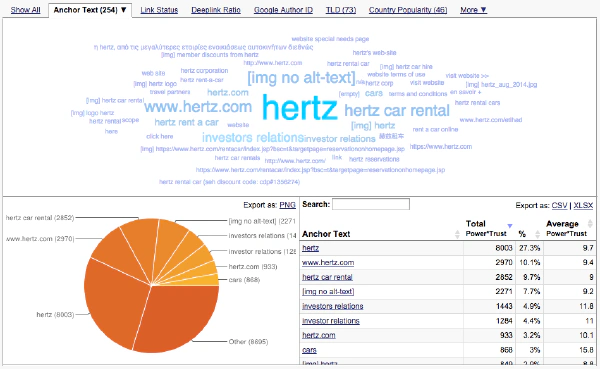
The keywords and anchor text distribution of your backlinks is shown by the anchor text cloud, a pie chart and a table. Here you can spot any abnormalities at a glance. There are similar sets of results for Link Status, Deeplink Ratio, Country Popularity, etc.
Link Profiles are SEO Metric Histograms for your Backlink Profile
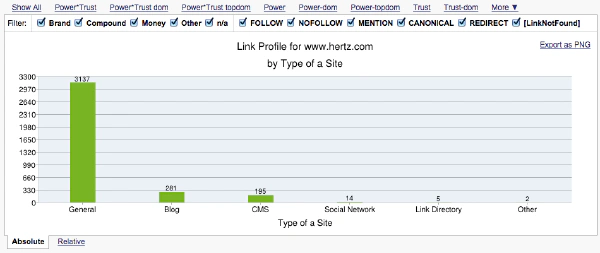
Many histograms are available to show a range of different metrics with advanced metrics such as theme, site type, and link location.
You can use these SEO data breakdown charts to spot trends and patterns in backlink profiles. This is where the data aggregation of so many link sources that LRT provides comes in handy, otherwise you’d be looking at a small slice of the data only.
In-depth analysis – link by link
The BLP, like many other tools, offers a detail link results table where you can see each link and dozens metric relevant to it.
You can slice and dice the data in real-time with simple and complex filters.
For each selection of links you can also apply multiple context sensitive actions like reach out to webmasters, start additional analysis steps or manage them in your favorites and list.
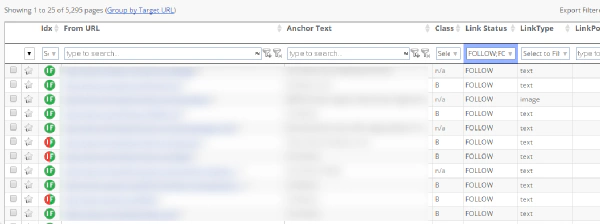
For example, by searching in the Anchor Text column for [IMG no alt-text] you will find images that have links to your site, but with no alt-text. In this case, it would be an advantage if the image did have alt-text, so you could reach out to the webmaster either manually or automatically via our integration with Pitchbox
Link Redirect Trace for all Redirected URLs
The Backlink Profiler gives you more details about links detected as redirects. You can simply filter in the “Link Status” to find all redirects with one click.
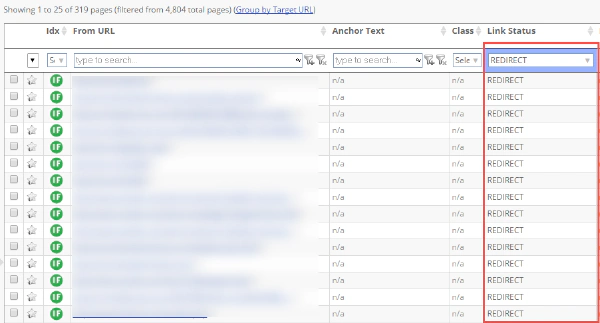
You will quickly see the type of redirect in the details. It shows you the From URL and the To URL plus information about the type, like 301 (moved permanently) or 302 (found) etc.
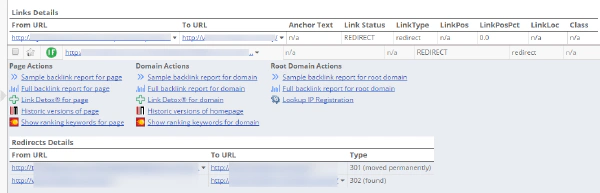
You can also read more about the powerful Link Redirect Trace feature and the browser extension we have for it.
Analysis of Link Velocity Trends
You can understand your own and competitor’s link growth and SEO campaigns better by looking at Link Velocity and Link Velocity Trends.
It is imperative that you understand the natural link growth patterns in your niche to be able to compete with other players.
Google does use link growth trends (i.e. link velocity trends of LVT) to understand which website try to manipulate their organic results. If your backlink profile grows too fast, you’re out. If you’re too slow, you won’t ever get on the first page.
Knowing how many links are enough for your website, or when you have too many links, is important when planning any campaign. Building too many backlinks over a short period may have a negative impact on your website’s rankings. If you build more links than most of the competitors in your niche it can look suspicious and may trigger a Google algorithmic filter.
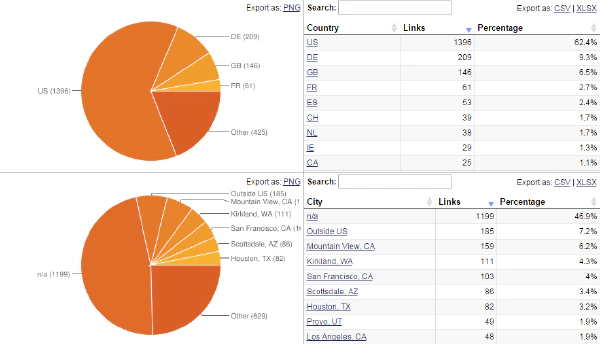
Which countries do my links come from? Enter Local Link Analysis
For a successful local link analysis, like with every other competitor backlink analysis, the best practice is to run the Backlink Profiler (BLP) analysis for each of your major competitors and review their profile in terms of geographical link source.
LinkResearchTools allows you to understand the regional spread of your backlinks by countries and even cities.
Detect deleted links and recreate them
You can find out which backlinks and their strength you lost in the past using the Backlink Profiler (BLP). If you lost a particular strong backlink you can get in touch with the webmaster to get that link back using the contact data LRT provides.
Features
Unique SEO Technique
This Link Building Method is not available in any other SEO tool.
25+ Link Data Sources
Link Data from 25+ Data Sources combined.
Full and Rich Exports
You get full XLS exports and rich PDF exports, while competitors cripple their data exports at sometimes 10k rows already.
Link Brain
We can assist you with decades of experience in SEO and links. This is not a matter of course with every SEO software provider.
Dynamic Filters
Filter your results by up to 150+ SEO metrics.
No Trash Data
The links that we DO NOT deliver to you matter! We take pride in filtering out as much nonsense data from other sources as possible.
How the Quick Backlink Checker works
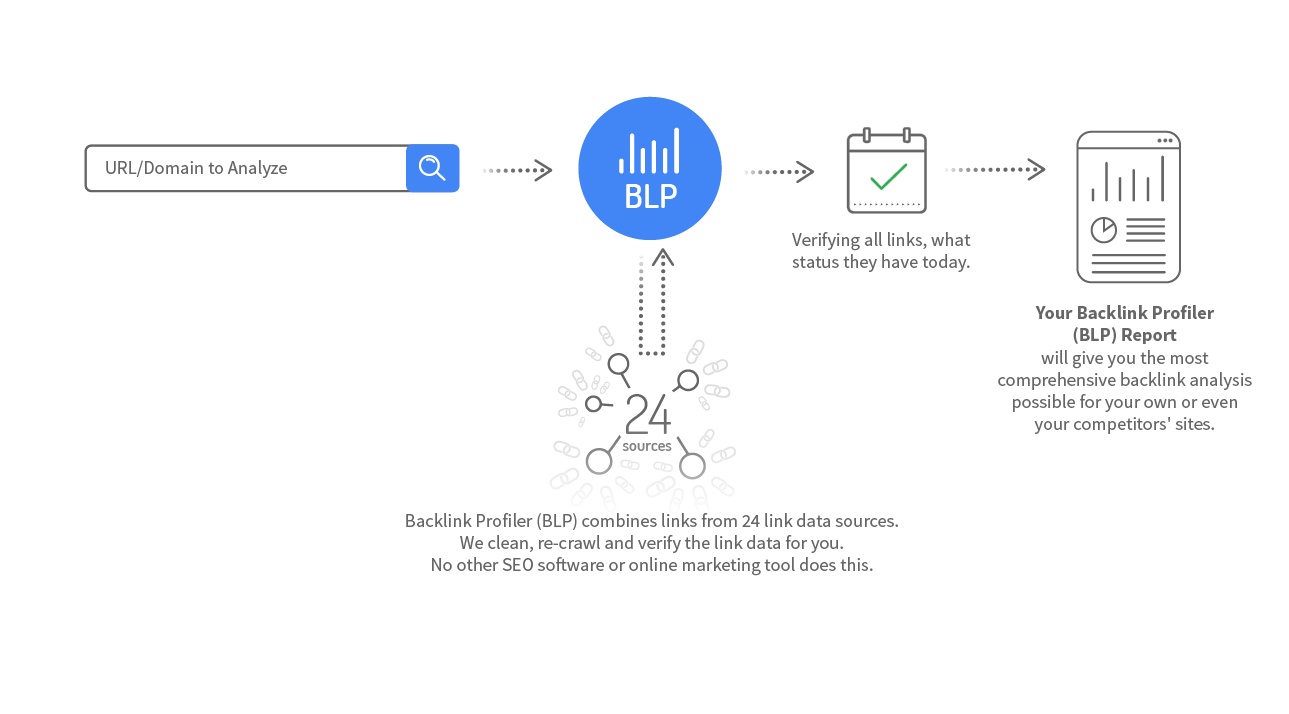
Learn more about Quick Backlink Checker
Read how Link Detox (DTOX) and Backlink Profiler (BLP) helped to find over 1000 black hat links that hit Expedia hard in 2013.
There are some excellent methods of link buildingto learn, which use the LinkResearchTools backlink building tools, but one of the easiest is using the BLP to find mentions that you can change to backlinks.